Building Your Exercise Library
The exercise library is the foundation of every workout plan you write. The global library covers the basics, but a well-built private library means less editing per plan, fewer client questions about form, and faster programming overall.
This guide covers how to think about your library, not just how to add exercises.
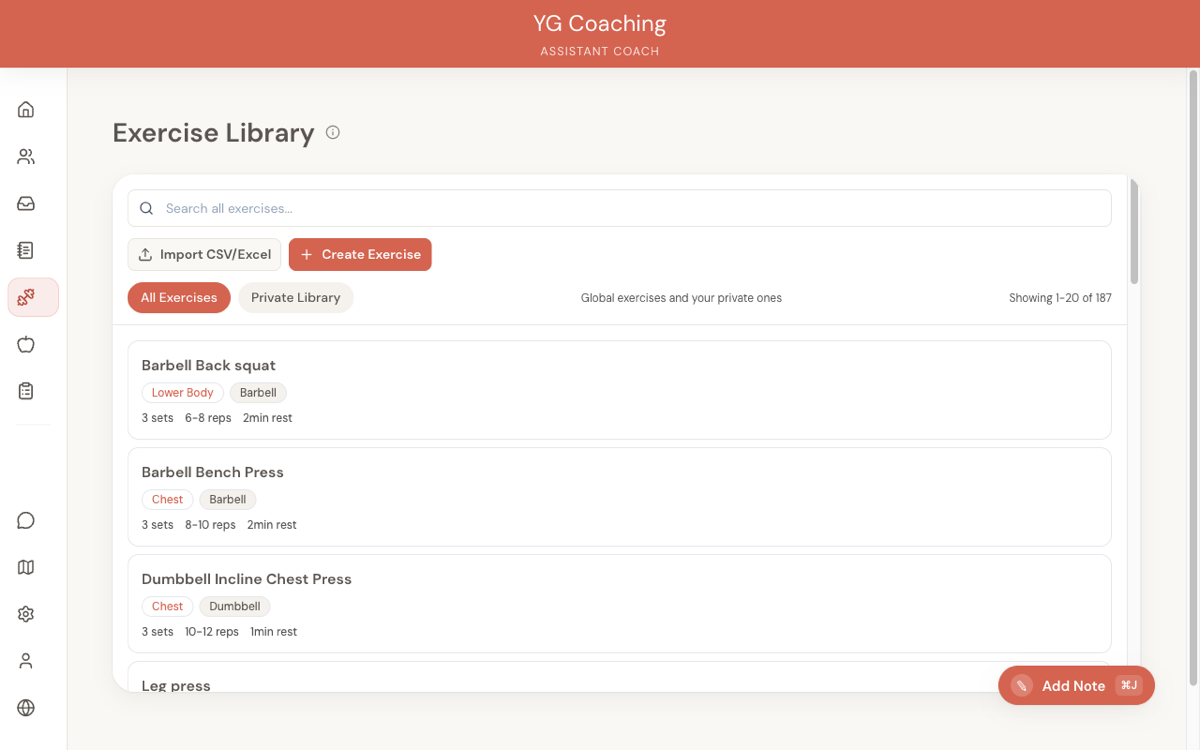
Global vs. private: when to use each
The Exercise Library has two layers: global exercises (available to all coaches) and private exercises (created by you, visible only to you).
Use global exercises when:
- The exercise name matches what you'd write anyway (e.g., Barbell Bench Press, Romanian Deadlift)
- You don't need custom form cues or a specific demo video attached to the exercise itself
- The default parameters are close enough that you'd only tweak them per-plan
Create a private exercise when:
- You use a branded name your clients know (e.g., "YG Glute Bridge" instead of "Glute Bridge")
- The movement is uncommon enough that clients won't find it on their own (e.g., a specific cable angle variation you programme regularly)
- You want specific form cues baked into the exercise notes so every plan that uses it inherits them
- You need a particular YouTube demo attached -- not just any bench press video, but the one that shows the exact setup you coach
The global library is a starting point, not a ceiling. Most coaches who programme seriously end up with 30-80 private exercises alongside the globals.
What custom exercises to add
Not every exercise needs a private entry. Here's what's worth creating:
Branded variations
If your clients know an exercise by your name for it, create a private version. This avoids confusion when they see their workout plan. "Coach Mike's Bulgarian Split Squat" with your specific stance width and depth cues is more useful than a generic entry they have to mentally translate.
Uncommon movements
Exercises that don't appear in the global library, or that your clients would struggle to look up on their own. Cable pull-throughs at a specific height, banded exercises with particular setup requirements, or sport-specific drills.
Exercises with form cues
Any exercise where you consistently give the same coaching cues belongs in your library with those cues in the Notes field. When a client opens their workout plan and taps on the exercise, they see your cues right there. This saves you from repeating the same form corrections in check-in responses.
Good notes are short and specific:
- "Pause 1 second at the bottom. Don't bounce."
- "Keep elbows pinned to your sides. If they flare, drop the weight."
- "Touch the bar to your chest, not your neck."
YouTube demo links
Adding demo videos is one of the highest-value things you can do in your library. Clients reference them before and during sessions, which means fewer "how do I do this?" messages and better execution.
Which exercises benefit most
Not every exercise needs a video. Prioritise:
- Exercises with technique that matters -- Deadlift variations, Olympic lifts, any movement where bad form risks injury or wastes the set
- Exercises your clients ask about repeatedly -- If you've explained the same movement three times in check-in responses, attach a video
- Uncommon movements -- Anything that won't show up easily in a generic YouTube search
- Your branded variations -- If the exercise is your specific version, a video of the generic movement won't match your cues
Skip videos for exercises that are self-explanatory (bicep curls, planks) unless you have a specific setup that differs from the standard.
Choosing good demo videos
Look for videos that:
- Show the full range of motion clearly, from a useful camera angle
- Are short (under 2 minutes) -- clients won't watch a 10-minute tutorial mid-session
- Match the form cues in your notes -- if your notes say "pause at the bottom" but the video shows touch-and-go reps, that's confusing
- Come from channels that won't disappear -- established fitness channels are safer than random uploads
If you record your own demo videos and upload them to YouTube, those are the best links to use. They match your coaching cues exactly and reinforce your brand.
Setting smart defaults
Every exercise has default sets, rep range, and rest period. These pre-fill when you add the exercise to a workout plan, so good defaults save real time.
Match your programming style
If you programme most hypertrophy work as 3 sets of 8-12 with 90 seconds rest, set those as defaults. If your strength work is typically 4 sets of 3-5 with 180 seconds rest, set that on your compound lifts.
Think about how you use each exercise most often:
| Exercise type | Typical defaults |
|---|---|
| Compound strength (squat, deadlift, bench) | 4 sets, 3-5 reps, 180s rest |
| Hypertrophy compounds (rows, presses) | 3 sets, 8-12 reps, 90s rest |
| Isolation work (curls, laterals, extensions) | 3 sets, 10-15 reps, 60s rest |
| Core and stability | 3 sets, 12-15 reps, 45s rest |
These are starting points. The specific numbers matter less than the principle: set defaults that reduce the number of fields you have to edit per plan.
Defaults don't lock you in
Changing the sets from 3 to 5 in a workout plan doesn't change the library default. Each plan instance is independent. So set defaults for your most common use case and adjust per-plan when needed.
CSV import for bulk setup
If you're migrating from a spreadsheet of exercises, don't create them one at a time. The CSV import feature lets you upload your entire library in one go.
How to use it:
- Download the CSV template from the Exercise Library page
- Fill in your exercises -- one row per exercise, with columns for name, muscle group, equipment, sets, reps, rest, YouTube URL, and notes
- Upload the completed CSV file
Tips for a clean import:
- Muscle group and equipment values must match exactly -- use the values from the template (e.g., "Chest" not "chest", "Barbell" not "barbell")
- YouTube URLs are optional -- leave the column blank for exercises without a demo
- Notes can contain commas -- wrap the notes field in quotes if it includes commas
- Check for duplicates first -- browse the global library before importing, so you don't create private exercises that already exist as globals
If you're coming from a spreadsheet coach workflow, the CSV import is the fastest way to get started. Get your exercises in first, then add YouTube links and refine notes over the following weeks as you build plans.
Organising for quick search
A well-tagged library is a fast library. When you're building a workout plan and need to find an exercise quickly, you're relying on the search and filter system.
Muscle groups
Assign every exercise a muscle group. This is the primary way you'll search when programming -- you're building a push session and need to find all your chest and shoulder exercises. The available groups are: Chest, Back, Shoulders, Legs, Arms, Core, Full Body.
For exercises that work multiple muscle groups, pick the primary one. A close-grip bench press is primarily chest (or arms, depending on your programming intent). Pick whichever reflects how you use it.
Equipment tags
Tag equipment accurately. When a client has limited equipment (travel, home gym), you can search by equipment to find alternatives quickly. The available tags are: Barbell, Dumbbell, Bodyweight, Machine, Cable, Kettlebell, Resistance Band, Other.
The unilateral flag
Mark single-limb exercises as Unilateral (e.g., single-leg RDL, single-arm dumbbell row). This helps when you need to programme unilateral work for balance or rehab purposes.
When NOT to create custom exercises
More exercises in your library is not always better. Avoid creating private exercises that:
- Duplicate a global exercise with a slightly different name -- If the global library has "Dumbbell Lateral Raise" and you create "DB Lat Raise", you now have two entries that do the same thing. Use the global and save your notes for the notes field in the plan.
- Exist only for a single client -- If only one client does a specific rehabilitation exercise, consider putting the details in their workout plan notes rather than cluttering your library with an exercise you'll use once.
- Differ only in parameters -- "Heavy Bench Press" and "Light Bench Press" shouldn't be separate exercises. They're the same exercise with different sets and reps -- handle that in the plan.
A focused library with 50 well-documented exercises is more useful than a bloated library with 200 entries you can't find anything in.
Related guides:
- Exercise Library -- feature reference
- Creating Workout Plans
- Exercise Substitutions