Getting Clients From Your Website
Assistant Coach includes a built-in coaching website -- a public profile page where prospects can learn about you and submit an enquiry. This page covers how to set it up, what to include, and how to turn those enquiries into paying clients.
Your website won't do the selling for you. But a well-built profile with a clear lead capture form removes friction for people who are already interested. The goal is to make it easy for the right prospects to reach you, and easy for you to respond quickly.
Setting up your coaching profile
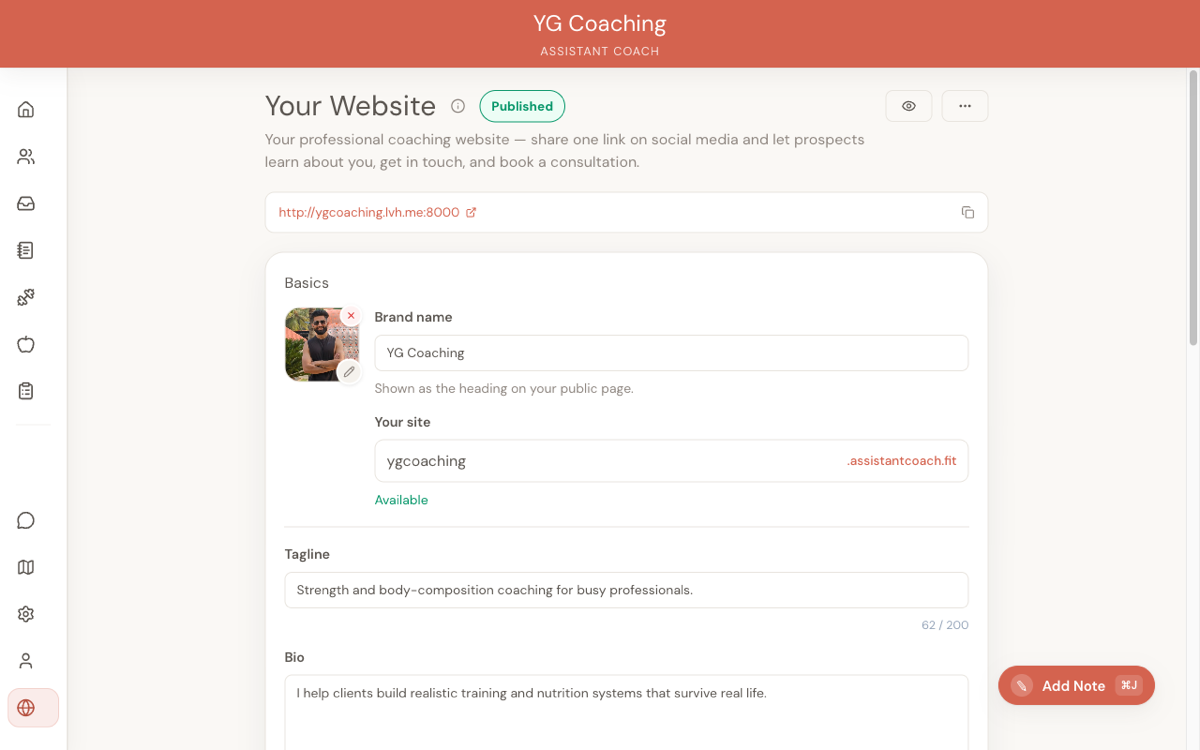
Go to Your Website in settings. This is where you configure everything that appears on your public page.
What to fill in
- Brand name -- Your coaching business name or your own name if you operate under a personal brand. This is the headline on your page.
- Tagline -- One line that tells a prospect what you do and who you do it for. "Online strength coaching for busy professionals" is better than "Helping you be your best self." Be specific.
- Custom URL slug -- Choose a clean, memorable slug. Your website URL will be based on this. Keep it short -- your name or brand name works best.
- Bio -- This is the section that does the most work. See below.
- Specialties -- List the areas you actually coach. Prospects scan these to check if you're the right fit.
- Certifications -- Include relevant qualifications. These build credibility, especially for prospects who are comparing multiple coaches.
Writing a bio that converts
Your bio needs to answer three questions a prospect is asking themselves:
- Is this person qualified? -- Mention your experience, your background, and how long you've been coaching. Specific numbers help: "I've worked with over 100 online clients" is stronger than "I have extensive experience."
- Do they work with people like me? -- Describe who you coach. If you specialise in postpartum fitness, say so. If you work with competitive powerlifters, say so. Trying to appeal to everyone appeals to no one.
- What's it actually like to work with them? -- Briefly describe your coaching style. Do you check in weekly? Do you adjust plans based on feedback? Prospects want to know what they're signing up for.
Keep it to 3-4 short paragraphs. Long bios don't get read.
Specialties and certifications
Specialties should reflect what you actually coach, not everything you know about. If you've studied sports nutrition but your clients are all general fat loss, list fat loss. Prospects are looking for a match, not a CV.
Certifications matter most to prospects who are new to coaching and don't have a referral. List your primary qualification first, then any relevant specialisations. Don't pad the list with weekend workshops -- it dilutes the ones that matter.
The lead capture form
Your website includes a built-in form where prospects submit enquiries. This is your first interaction with a potential client, so the questions should give you enough information to have a useful reply without asking so much that prospects abandon the form.
What to ask
A good lead capture form covers:
- Name and email -- The basics. You need these to reply.
- What are you looking for? -- An open text field. Let prospects describe their goals in their own words. This tells you more about their mindset than a dropdown ever will.
- Training experience -- A rough sense of where they are. Something like "How long have you been training?" with a few options (beginner, 1-2 years, 3+ years) helps you gauge the conversation.
- How did you find me? -- Useful for understanding which channels are actually working. Keep it optional so it doesn't slow down motivated prospects.
What not to ask
Don't turn the lead form into an intake form. You're not onboarding this person yet -- you're starting a conversation. If the form takes more than 2 minutes to fill out, you'll lose people.
Avoid asking for phone numbers unless you genuinely plan to call. Asking for a phone number when you're going to email anyway signals that you don't respect their time.
The leads inbox
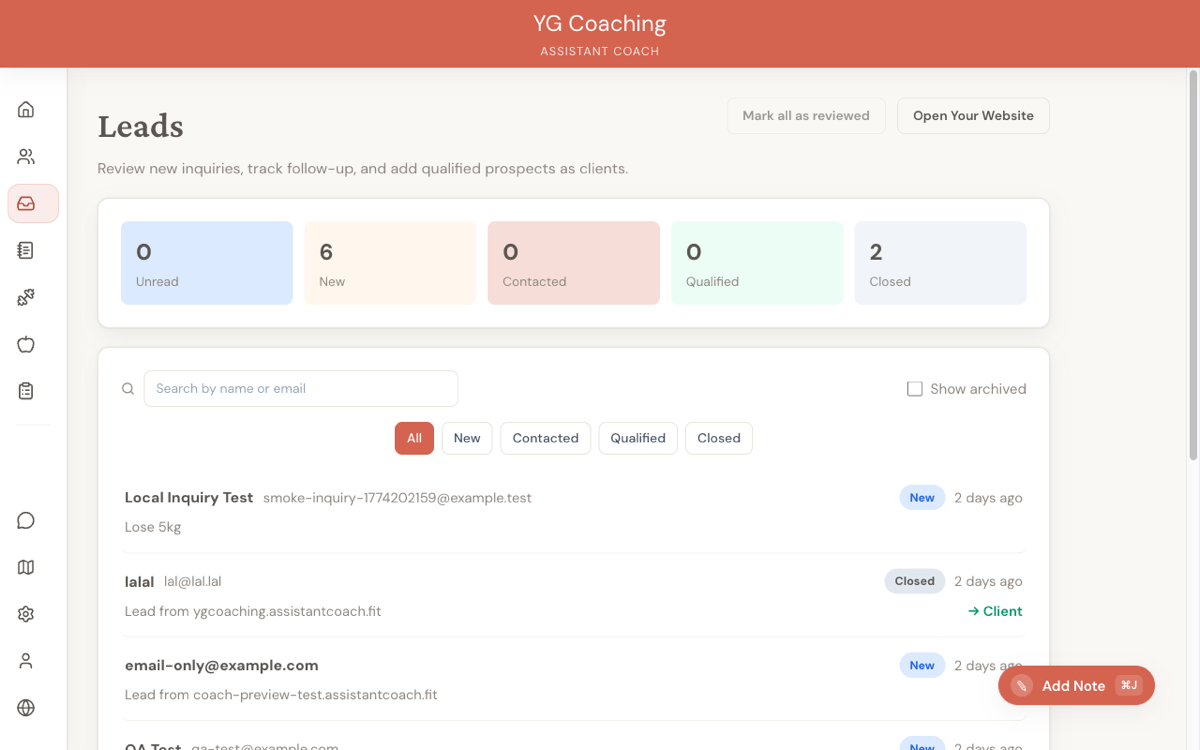
When a prospect submits your form, their enquiry appears in the Leads inbox on your dashboard. This is your triage centre for all inbound interest.
Triage quickly
Speed matters. A prospect who fills out your form is interested right now. If you reply within a few hours, you're competing with their motivation. If you reply in three days, you're competing with their forgetfulness.
Triage each lead into one of three buckets:
- Good fit -- respond now. Their goals match your speciality, they seem serious, and you have capacity. Send a personalised response the same day.
- Maybe -- need more information. Their enquiry is vague or you're not sure they're a good fit. Ask a clarifying question. Don't write a sales pitch until you know what they need.
- Not a fit -- decline gracefully. If you don't coach what they're looking for, say so honestly and point them in the right direction if you can. A respectful decline builds your reputation more than ignoring them does.
Writing a good first response
Your first reply sets the tone for the coaching relationship. Keep it:
- Personal. Reference something specific they wrote in their enquiry. "You mentioned you've been struggling with consistency after your second kid" shows you actually read their submission.
- Clear about next steps. Tell them exactly what happens next. "I'd love to set up a quick call to learn more about your goals -- here's my booking link" is better than "Let me know if you're interested."
- Brief. This is a conversation starter, not a sales page. 4-6 sentences is enough.
Converting leads to clients
When a prospect is ready to start coaching, you don't need to manually set them up. From the Leads inbox, you can convert a lead to a client with one click.
What the conversion does:
- Creates a client record with the prospect's name and email
- Sends them an invitation to join as a client
- Moves the lead out of your inbox and into your client list
That's it. No re-entering data, no switching between screens. The prospect's enquiry details are preserved so you can reference them when building their first plan.
When to convert
Convert after you've had enough back-and-forth to confirm:
- They understand your coaching offering and pricing
- Their goals are something you can help with
- They're ready to commit (not just browsing)
Don't convert too early. A lead who gets a client invitation before they've decided to sign up will feel rushed. Have the conversation first.
Adding a booking link
Most coaches want a discovery call before committing to a new client. In Your Website settings, you can add an external booking link (e.g., Calendly, TidyCal, or any scheduling tool you use). This link appears on your public profile page.
Tips for your booking link:
- Keep the call short. 15-20 minutes is enough for a discovery call. Longer slots lead to unfocused conversations.
- Add a question to your booking form. Most scheduling tools let you add a pre-call question. Ask "What's your main goal?" so you're not going in cold.
- Mention the call in your lead responses. When replying to a lead, include your booking link directly: "Here's a link to book a quick 15-minute call so we can chat about your goals."
Website analytics
Your website tracks basic visitor and lead metrics so you can understand what's working. Check these periodically -- you don't need to obsess over them daily, but they'll tell you whether your profile is actually converting visitors into enquiries.
Key metrics to watch:
- Page views -- How many people are visiting your profile. If this is low, the issue is traffic, not your page content.
- Form submissions -- How many visitors actually submit an enquiry. If views are high but submissions are low, your profile or form needs work.
- Conversion rate -- Submissions divided by views. A healthy rate depends on your traffic source, but anything above 5-10% for warm traffic (social media followers, referrals) is reasonable.
- Response time -- How quickly you're replying to leads. Track this yourself even if the platform doesn't surface it. Faster responses close more clients.
Driving traffic to your website
Having a website means nothing if nobody visits it. Here are practical ways to get your profile in front of prospects:
- Link in your social media bios. Instagram, TikTok, Twitter, LinkedIn -- put your coaching website URL in every bio. This is the lowest-effort, highest-impact move.
- Share it in content. When you post educational content about training or nutrition, end with a call to action pointing to your website. "If you want help with this, link in bio" actually works when the link goes somewhere useful.
- Add it to your email signature. Every email you send is a passive advertisement.
- Ask for referrals. Happy clients are your best marketing channel. Make it easy by giving them your website link to share. A URL is easier to pass along than a paragraph explanation of what you do.
- Local communities and forums. If you're active in fitness communities (Reddit, Facebook groups, Discord servers), have your website link ready for when people ask for coach recommendations. Don't spam -- contribute genuinely and let people find you.
- Google your own name. If your website doesn't show up when someone searches your name plus "coaching," you have an SEO problem. Make sure your profile bio includes the keywords prospects would search for.
The common mistake is building the website and then waiting. Your website is a landing page, not a billboard. You need to actively send people to it.
Related guides:
- Managing Multiple Clients -- scaling your workflow when your roster grows
- Onboarding a New Client -- the full workflow from intake to first check-in
- Your Website -- feature reference for website setup and customisation