Your Intake & Check-in Forms
The quality of your coaching depends on the quality of the data you collect. Good forms give you the information you need to write plans, track progress, and make decisions. Bad forms either miss critical data or ask so much that clients stop filling them out.
This page covers what to include in your intake and check-in forms, and how to keep them short enough that clients actually complete them.
Intake form essentials
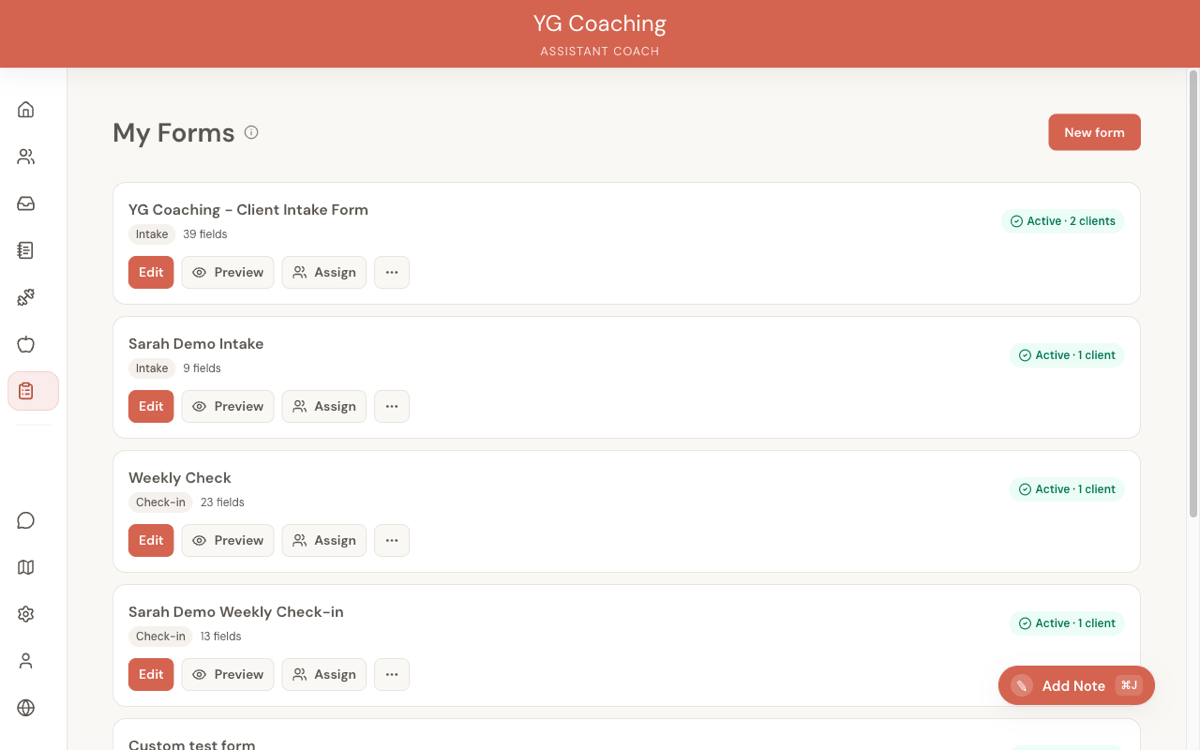
Your intake form runs once when a client joins. It's your only chance to get the full picture before you write their first plan. Build your intake form template in the Forms section using the Form Templates page.
Every intake form should cover these areas:
Training history
- Current training frequency and style (gym, home, sport-specific)
- How long they've been training consistently
- Previous programmes they've followed
- Exercises they're comfortable with and ones they've never done
This determines your workout plan complexity. A client with two years of consistent training gets a different programme than someone who's never touched a barbell.
Injury and medical history
- Current injuries or pain points
- Past injuries that still affect movement
- Medical conditions relevant to exercise or nutrition (e.g., diabetes, thyroid, PCOS)
- Medications that may affect weight, appetite, or energy
Ask this as an open text question, not a checklist. Clients will mention things you'd never think to list. A question like "Is there anything about your health or injury history I should know about?" catches more than a checkbox list.
Goals and motivation
- Primary goal (weight loss, muscle gain, strength, general fitness)
- Why now — what triggered them to seek coaching
- Any specific targets (a goal weight, a race, a holiday deadline)
- What they've tried before and why it didn't work
Their words tell you how to frame your coaching. A client who says "I want to feel confident at the beach" needs different messaging than one who says "I want to squat 140kg."
Lifestyle and schedule
- Work schedule and hours
- Training availability (days per week, time of day)
- Gym access and equipment
- Travel frequency
- Stress levels and sleep patterns
These are the practical constraints on your programming. A shift worker with 3 days of gym access and frequent travel needs a fundamentally different approach than a 9-to-5 office worker with a home gym.
Dietary information
- Current eating habits (meals per day, cooking vs. eating out)
- Dietary restrictions (allergies, intolerances, religious, ethical)
- Foods they dislike or refuse to eat
- Previous dieting experience (calorie counting, macro tracking, meal plans)
- Supplements they're currently taking
This shapes your meal plan complexity. If they've never tracked a macro, your first plan should be simple.
Check-in form: short but complete
Check-in forms are submitted weekly. Every extra question adds friction, and friction kills compliance. Your check-in form should take a client no more than 5-10 minutes to complete.
Essential metrics (always include)
- Bodyweight — Number question. The single most useful data point for tracking trends.
- Training adherence — "How many sessions did you complete this week?" Tells you if the programme volume is realistic.
Optional metrics (pick what matters)
Not every client needs every metric. Choose based on their goals:
- Average daily steps — Useful for fat loss clients where NEAT matters.
- Average sleep hours — Useful for clients where recovery or energy is a concern.
- Water intake — Useful early on for clients with poor hydration habits. Drop it once the habit is established.
- Waist measurement — More reliable than weight alone for body composition clients.
Start with fewer metrics and add more later. It's easier to add a question in week 4 than to deal with a client who stops checking in because the form feels like homework.
Subjective questions
Numbers tell you what happened. Subjective questions tell you why.
- "How did this week feel overall?" — Open text. Gives you context for the numbers. A client who hit all their macros but writes "I was miserable" needs an adjustment.
- "Any struggles or wins this week?" — Surfaces problems they might not mention otherwise (social events, cravings, motivation dips).
- "How is your energy and recovery?" — Catches overtraining, under-eating, and sleep issues early.
- "Any questions for me?" — Gives them a space to ask without feeling like they're bothering you.
Keep subjective questions to 2-3. More than that and the answers get thin.
Photo requirements
Progress photos are one of your most valuable coaching tools, especially when the scale isn't moving.
- Front, side, and back poses — Three photo questions, one per angle.
- Consistent conditions — Add a note to the form: "Same time of day, same lighting, same clothing."
- Required vs. optional — Make photos required at minimum every 2-4 weeks. Weekly is ideal but some clients resist it.
If a client is reluctant about photos, explain that photos are for coaching purposes only and that visual progress often shows weeks before the scale moves. Frame it as a tool for them, not a judgment.
Custom questions: when to add per-client overrides
Your form templates cover the standard case, but some clients need extra questions. In the Form Templates page, you can duplicate a template and customize it for a specific client, or create a new one from scratch.
Common reasons to add custom questions:
- Injury rehabilitation — "Rate your knee pain this week (1-10)" for a client recovering from an injury
- Specific habit tracking — "Did you take your creatine every day?" for a client working on supplement consistency
- Sport-specific metrics — "What was your longest run this week?" for an endurance athlete
- Accountability items — "Did you meal prep on Sunday?" for a client who identified meal prep as their biggest barrier
When not to customize:
Don't add custom questions just because you can. Every question should drive a coaching decision. If you wouldn't change anything based on the answer, don't ask it.
Form length: the trade-off
There's a direct relationship between form length and completion rate. The data is clear across coaching businesses:
| Form type | Target length | Completion time |
|---|---|---|
| Intake form | 15-25 questions | 10-15 minutes |
| Weekly check-in | 8-12 questions | 5-10 minutes |
Intake forms can be longer because clients only fill them out once, they're motivated (they just signed up), and incomplete intake data creates problems for months.
Check-in forms must be short because clients fill them out every week, motivation fluctuates, and a missed check-in is a missed coaching opportunity.
If you notice clients submitting late or skipping check-ins, your form is probably too long. Cut it down to the essentials and see if compliance improves before blaming the client.
Review your form templates every few months. Questions that were useful when you had 5 clients may not scale when you have 20. If you're not using a piece of data in your coaching decisions, remove the question.
Related guides:
- Onboarding a New Client -- the full workflow from intake to first check-in
- Form Templates -- feature reference for the form builder
- Client Submissions -- how to view and review submitted forms