Managing Multiple Clients
Coaching 5 clients feels manageable. Coaching 20 feels like a different job. The work itself doesn't change — you still review check-ins, adjust plans, and respond to clients — but without a system, things slip. A check-in sits unreviewed for three days. A plan renewal gets forgotten. A client's slow decline in adherence goes unnoticed until they're ready to cancel.
This page covers how to use Assistant Coach's tools to build that system, so the quality of your coaching doesn't degrade as your roster grows.
The home page as your daily triage system
The Home page shows a to-do list of pending actions across all your clients: check-ins waiting for review, intake forms to process, plans that need updating. This is your cockpit.
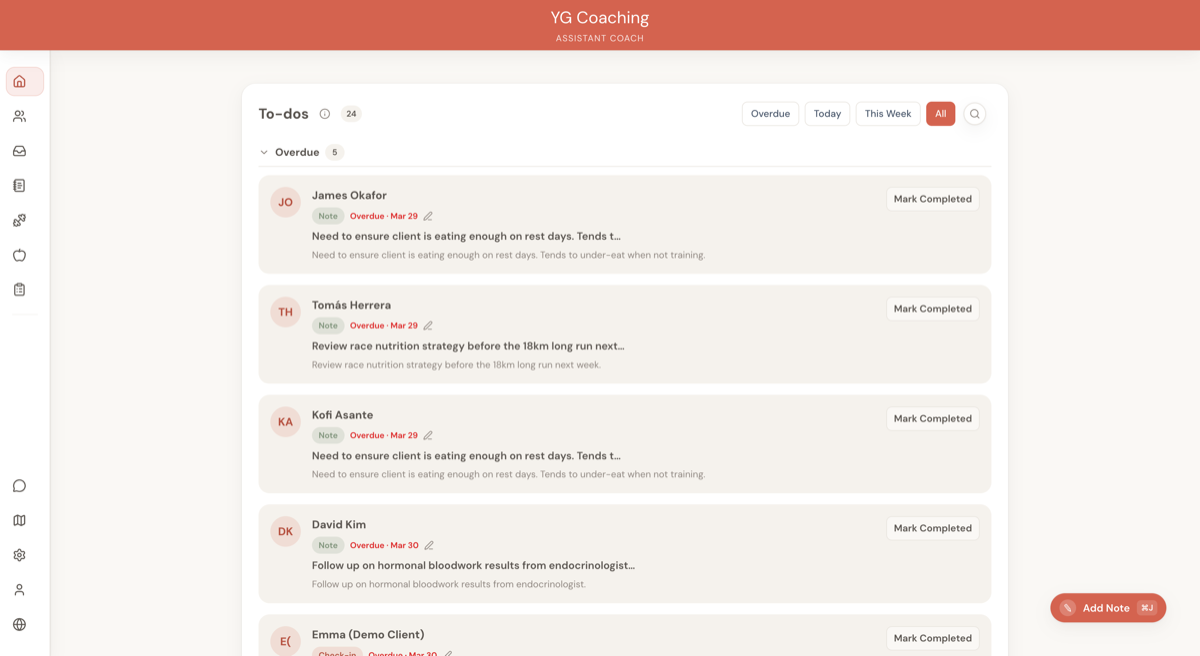
Start every working day here. Before opening any individual client dashboard, scan the to-do list and sort your work into three categories:
- Do now — Check-ins from clients who submitted 2+ days ago. These are overdue and the client is waiting.
- Do today — Check-ins from yesterday or today. These are on schedule and can be batched (see below).
- Do this week — Plan renewals, goal reviews, and non-urgent follow-ups. These don't need same-day attention but shouldn't drift past the week.
The to-do list is not just a notification feed. Treat it as a task queue that you work through deliberately, not a list of interruptions that pull you in different directions.
If you find yourself jumping between clients randomly based on whoever submitted most recently, you're reacting instead of managing. Work the list top to bottom after you've triaged.
Batch check-in reviews
Reviewing check-ins one at a time, as they arrive, is the single biggest time sink for coaches with more than 10 clients. Every context switch — opening a client's dashboard, remembering where they are in their programme, writing a response, switching to the next — costs you time.
Batch instead. Set aside a dedicated block (60-90 minutes works for most coaches with 15-20 clients) and process all pending check-ins in one sitting.
How to batch effectively:
- Open the Home page and note all clients with pending check-ins
- Work through them in order — don't skip around based on who you feel like reviewing
- For each check-in: review the data, check their previous response for continuity, write your response, flag any plan changes needed
- If a check-in requires a plan change, add a to-do with a due date rather than switching to the plan builder mid-batch. Plan changes are a separate work block.
Batching works because you stay in "review mode" — the same mental process repeated across clients. Switching between reviewing, plan-writing, and admin constantly is what makes 20 clients feel like 50.
Template plans: build once, customise many
Writing every meal plan and workout plan from scratch is unsustainable past 10 clients. Most of your clients share common patterns — a fat loss client training 4 days a week needs a similar structure whether they're male or female, 25 or 45.
The approach:
- Build base plans for your most common client profiles. A "4-day upper/lower hypertrophy" workout plan. A "1,800 kcal fat loss" meal plan. These are your templates.
- Duplicate the base plan when assigning it to a new client. Both meal plans and workout plans support duplication from the plan builder.
- Customise the duplicate for the individual — swap exercises for equipment constraints, adjust calories for their specific targets, tweak the schedule for their training availability.
What makes a good base plan:
- It covers your most common programming scenario (the plan you'd write for 60% of your clients with that goal)
- It uses exercises from your library with smart defaults already set, so less editing per duplicate
- It has a sensible structure that requires tweaking, not rebuilding — adjust sets and food quantities rather than rearranging entire days
Over time, you'll accumulate 4-6 base plans that cover the majority of your roster. A new client onboarding goes from "write everything from scratch" to "duplicate, customise, assign" — a process that takes minutes instead of an hour.
Name your base plans clearly so you can find them fast. "4x Upper Lower - Hypertrophy - Intermediate" is more useful than "Template Plan 3" when you're scanning a list of 15 plans.
Notes and to-dos as your organisational backbone
When you're coaching 5 clients, you can keep everything in your head. At 20, you can't. Notes and to-dos fill the gap.
Use notes for client context that persists across weeks:
- Programming decisions and the reasoning behind them ("Switched from conventional to sumo deadlift due to lower back discomfort — reassess in 4 weeks")
- Lifestyle constraints that affect coaching ("Works nights every other week — training and nutrition compliance drops during night shifts")
- Preferences and dislikes you'll forget by next month ("Hates broccoli. Don't put it in the meal plan again.")
Use to-dos for actions with deadlines:
- "Review Sarah's squat progress photos — due Friday"
- "Check if Mark's knee pain has improved — follow up next check-in"
- "Reassess James's calorie target after 4 weeks of maintenance — due March 15"
To-dos with due dates show up in your Home page to-do list alongside check-in reviews and other pending actions. This means everything you need to do across all clients lives in one place — nothing falls through the cracks because it was stored in your memory instead of in the system.
The difference between a coach who drops balls at 15 clients and one who runs smoothly at 30 is almost always whether they write things down.
Your weekly rhythm
A structured week prevents the "everything all at once" feeling. The exact schedule depends on your setup, but here's a pattern that works for most coaches:
Check-in review days
Set your clients' check-in days so submissions cluster on 1-2 days of the week. If most clients check in on Sunday or Monday, you can batch-review on Monday and Tuesday.
- Monday — Review weekend check-ins. This is typically the highest-volume day.
- Tuesday — Catch stragglers and any check-ins that need a second look.
Programming days
Plan changes shouldn't happen mid-review (see batching above). Dedicate separate time to programming work:
- Wednesday or Thursday — Update workout plans and meal plans based on the week's check-in findings. Work through the to-dos you flagged during your Monday/Tuesday reviews.
Admin and planning
- Friday — Handle onboarding for new clients, goal reviews, and any admin tasks. This is also a good day to review your to-do list for anything that's been sitting too long.
This rhythm means clients who check in on Sunday get a response by Monday or Tuesday. Clients know roughly when to expect your review. And you're not context-switching between review, programming, and admin all day every day.
Trend Analysis for catching what you'd miss
When you're reviewing 15-20 check-ins per week, it's easy to miss slow-moving patterns. A client's weight is trending up over 6 weeks, but each individual check-in looks fine. Adherence is slowly declining, but the week-to-week drop is too small to notice.
Trend Analysis runs across a client's full check-in history and surfaces these patterns for you. Use it:
- During your weekly review — After finishing a client's check-in response, glance at their trends. Are the numbers moving in the right direction? Is adherence stable?
- When something feels off — If a client seems stuck but you can't point to a specific bad week, Trend Analysis often reveals the pattern: a gradual calorie creep, a slow decline in training frequency, or a weight plateau masked by week-to-week fluctuations.
- Before plan renewals — Before writing a new phase for a client, review their trends over the past 8-12 weeks. This gives you an evidence-based starting point instead of relying on your memory of how things have been going.
Trend Analysis doesn't replace your coaching judgement. It makes sure your judgement is working with complete data, not just the last check-in you remember reading.
Setting client expectations
Response time is the most common source of friction between coaches and clients. Not because coaches are slow, but because clients don't know when to expect a response.
Be explicit about your turnaround time during onboarding. A simple statement in your welcome message covers it:
"I review check-ins within 48 hours of submission. If you check in on Sunday, you'll hear back from me by Tuesday."
This does two things: it gives the client a clear expectation so they're not refreshing their app on Sunday evening wondering why you haven't responded, and it gives you a defined window so you're not feeling guilty about not responding within hours.
Other expectations worth setting:
- Check-in day — Configure their check-in day in the client settings. Clients who check in on a consistent day are easier to batch-review, and they build a habit.
- Questions outside check-ins — Decide whether you accept mid-week messages and communicate that. Some coaches encourage it, others prefer everything goes through the weekly check-in. Either is fine, but make it clear.
- Plan change turnaround — If a check-in triggers a plan change, tell the client when to expect the updated plan. "I'll have your new workout plan ready by Thursday" is better than silence followed by a plan appearing three days later.
Setting expectations is not about limiting your availability. It's about making your process predictable so clients trust the system and you can protect the focused work blocks that make scaling possible.
Related guides:
- Your Weekly Workflow -- structuring your coaching week
- Writing Great Check-in Responses -- what to write and how to frame it
- Coaching Scenarios -- using notes effectively as a client knowledge base