Weekly Goals
A weekly goal is something you want your client to do most weeks — like averaging 8,000 steps a day, sleeping at least seven hours a night, or training four times a week. There's no finish line. Each weekly check-in either hits the bar or it doesn't, and the goal card on your dashboard quietly keeps score so you can spot when to step in.
Looking for the day-by-day tracker instead? Use Daily Habits when a client should answer from the Today card and you want to see Monday through Sunday separately.
This is the goal type that powers the bulk of "is she actually doing the work?" coaching. If you've ever wished you didn't have to scroll through a stack of check-ins to see whether a client is drifting on their step count, this is the page that does that for you.
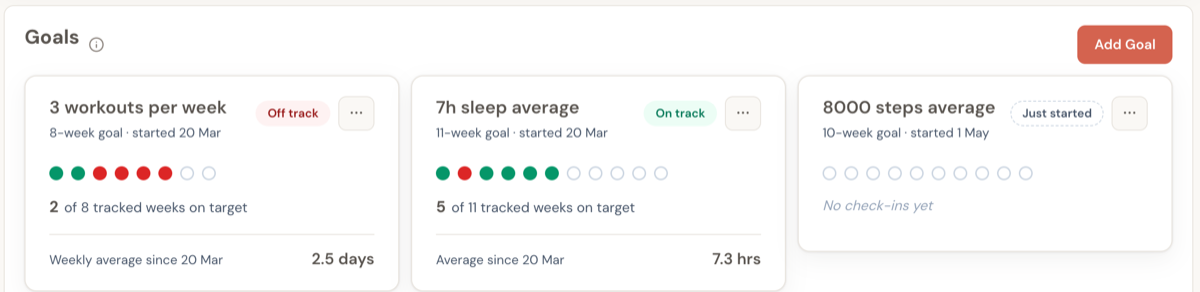
The three cards above are all weekly goals on the same client's dashboard. They're showing three different states at a glance — a goal she's drifting on, one she's nailing, and one that just started. You don't need to read the numbers to know which one needs your attention this week.
When a weekly goal is the right choice
Use a weekly goal for any recurring weekly behaviour where the question is "is she doing this consistently?" — not "has she reached this number?"
- "I want her to walk more" → weekly goal on Average steps
- "She needs to sleep more" → weekly goal on Average sleep
- "I want her training four days a week" → weekly goal on Days worked out
- "She needs to drink more water" → weekly goal on Average water intake
For weight loss, body fat, or hitting a deadlift PR, use a Tracking Goal instead — those have a finish line and work differently.
Setting up a weekly goal
Open a client's dashboard, scroll to the Goals section, and click Add Goal.
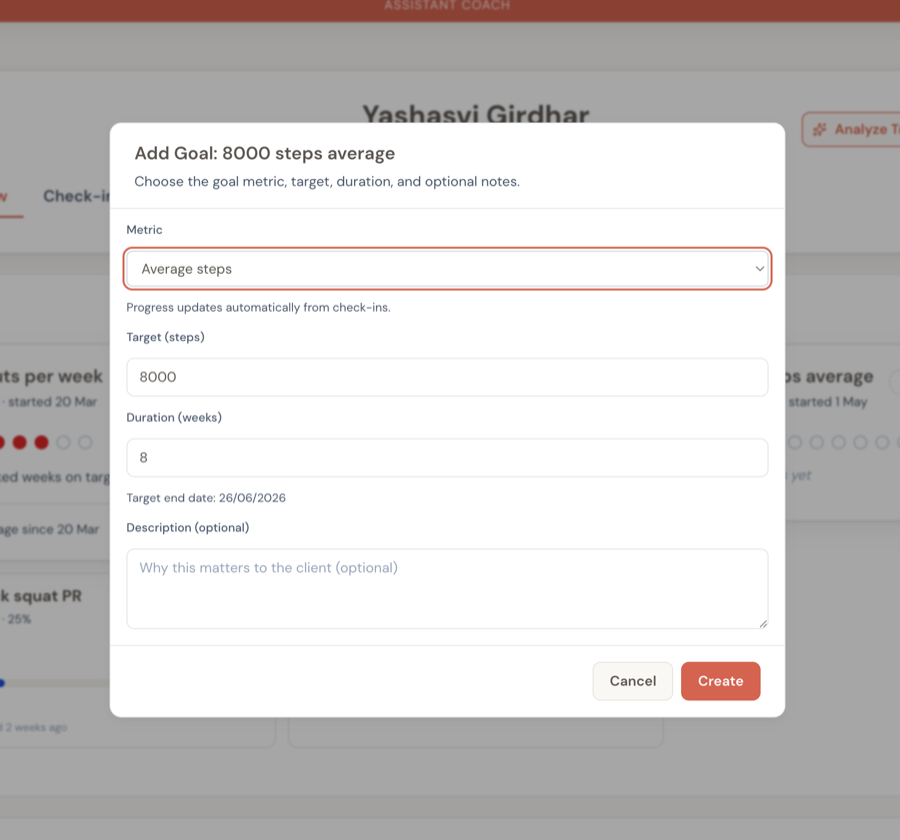
Pick one of the four habit-goal metrics, set the target, and choose how many weeks the goal should run. That's everything. Once saved:
- The card appears on her dashboard alongside her other goals
- The goal also shows up on her client app — so she can see what she's working toward
- From the next check-in onwards, the card updates itself — no manual progress entry, ever
The duration matters. A short goal (4–6 weeks) creates urgency for forming a new habit. A longer one (10–12 weeks) is for habits she's already partly doing and you want to lock in. There's no right answer — pick something that gives her enough check-ins to show a pattern.
Set the target slightly below where she's already getting on her best weeks, not where you wish she was. A goal she hits 60% of the time builds confidence. A goal she hits 10% of the time teaches her she can't do it. Move the bar up as she clears it.
Reading the card at a glance
The card is designed so you can read it in one glance during a check-in batch. Six things to notice:
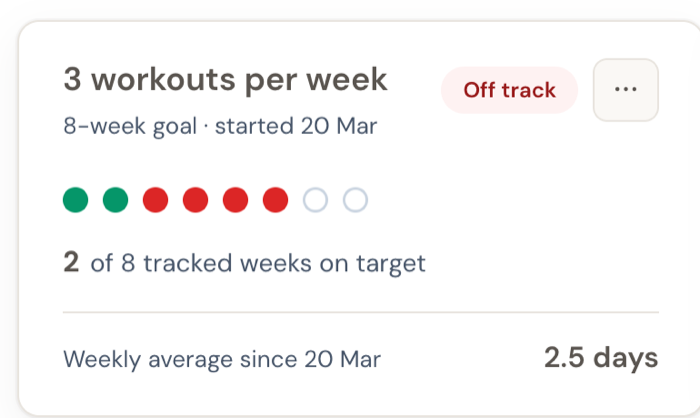
| What you see | What it tells you |
|---|---|
| Title (e.g. "3 workouts per week") | The goal in plain English. This is what shows up on her client app too. |
| Subtitle (e.g. "8-week goal · started 20 Mar") | How long the goal runs and when it began. Useful when you're scanning a card you set up six weeks ago. |
| Status pill | The fastest read. Colour-coded — green is good, amber is "watch this", red is "act now", grey/muted is neutral. See the table below. |
| Dot row | One dot per week of the goal window. Green = she hit the goal that week. Red = she missed. Hollow = no check-in yet (either still upcoming, or she didn't submit). |
| "X of Y tracked weeks on target" | The bottom-line score. Reads at a glance: 5 of 6, you're winning. 2 of 8, you're losing. |
| "Average since…" | Her running average across all check-ins since the goal began. Shifts a little each time a new check-in comes in. |
Hover any dot to see the date and the value she logged that week — useful when a single bad week is throwing off your sense of the trend.
What the status pill is actually telling you to do
The pill is the single most actionable thing on the card. Each colour and label maps to a specific coaching move. There are eight possible states.
While the goal is in progress
| Pill | What's happening | What to do this week |
|---|---|---|
| 🔘 Just started | No check-ins in the goal window yet. Card is empty. | Wait. The card will fill in as soon as the next check-in comes in. |
| 🟢 Hitting recently | Both of her last two weeks hit the target. | Acknowledge it in your check-in response — small wins compound when they're noticed. |
| 🟢 On track | Four weeks in a row she's hit the goal. This is a real pattern. | Decide: is the bar still ambitious enough? Consider raising the target or graduating her to maintenance. Don't leave a goal too easy for too long — it stops being motivating. |
| 🟠 Needs attention | She missed one of her last two weeks. | Worth a quick "how was this week?" in your response. One miss is normal — you're flagging it before it becomes two. |
| 🔴 Missing recently | Two weeks in a row she didn't hit the goal. | Time to have the conversation. The "never miss twice" rule says one miss is normal but two in a row is the moment to step in — before it becomes a pattern she's resigned to. |
| 🔴 Off track | Four weeks straight she hasn't hit it. | The goal as you've set it isn't working for her right now. Time for a real conversation: is the target too high? Is something else getting in the way? Either pause this goal, lower the target, or replace it with something more attainable. |
After the goal window ends
| Pill | What's happening | What to do |
|---|---|---|
| 🟢 Completed | The goal window has ended and she hit the target most weeks (75%+). | Celebrate it in your next message. Then plan the next goal — slightly harder, or in a new area. |
| ⚪ Missed | The goal window ended and she didn't hit it most weeks. | Reflect together. Was the target right? What got in the way? Plan the next goal with what you learned. Don't just renew the same goal at the same target. |
When a goal's planned end date passes but you haven't ended it yet, the card shows a review prompt asking you to either end it or extend the date. That's there so a forgotten goal doesn't keep generating misleading pills indefinitely.
What "hits the goal" actually means
If the target is 8,000 steps a day and her average for the week was 8,200 — that's a hit. If she logged 7,500 — that's a miss, even though she was close. We compare against at least the target. Closer-but-under still counts as a miss.
That's deliberate. Habit research shows that consistently clearing a clear bar matters more than averaging close to it. A bar she beats four weeks in a row builds identity ("I'm someone who walks 8k a day"). A bar she keeps just-missing builds frustration. So the card is harsh on purpose — it's giving you the read that matches what actually drives behaviour change.
The "Average since…" line is computed across all her check-ins since the goal began. It can be useful sanity-check context (her dot row says "2 of 6" but the average is 9,500 — she's hitting the spirit of the goal even if not the letter), but the dot row is what to coach against.
Capturing your observations as progress notes
The card shows you the pattern. Progress notes are where you write down what you're going to do about it.
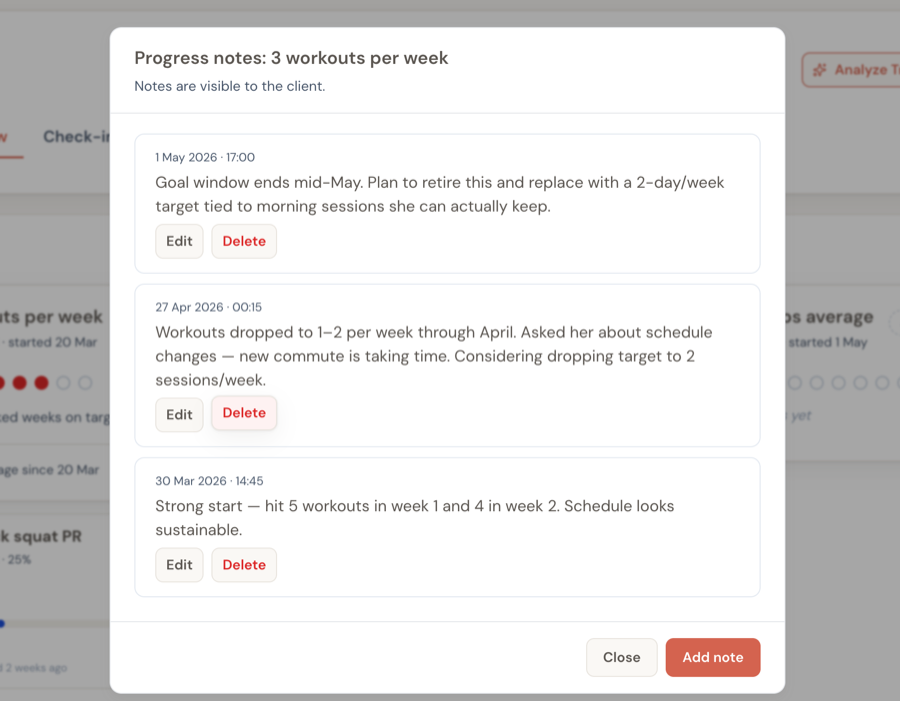
Open them from the ⋯ menu on any goal card. Notes are visible to your client too, so they double as a record of why a coaching decision was made — useful when she comes back in three weeks asking "wait, why did we change the target?".
Good things to capture in a progress note:
- A pattern you've noticed — "Workouts dropped to 1–2 per week through April. New commute is taking time."
- A decision you've made — "Considering dropping target to 2 sessions/week. Will discuss in next check-in."
- Something the client committed to — "Agreed to prioritise mornings — 6am alarm 4x this week."
- A milestone — "Hit 5 workouts in week 1 and 4 in week 2. Schedule looks sustainable."
What progress notes are not for: the weekly response to her check-in. That goes in the check-in response. Progress notes are for the trajectory of the goal, which is a longer arc.
Ending the goal — celebrate or course-correct
When you click End goal from the card menu, this dialog appears.
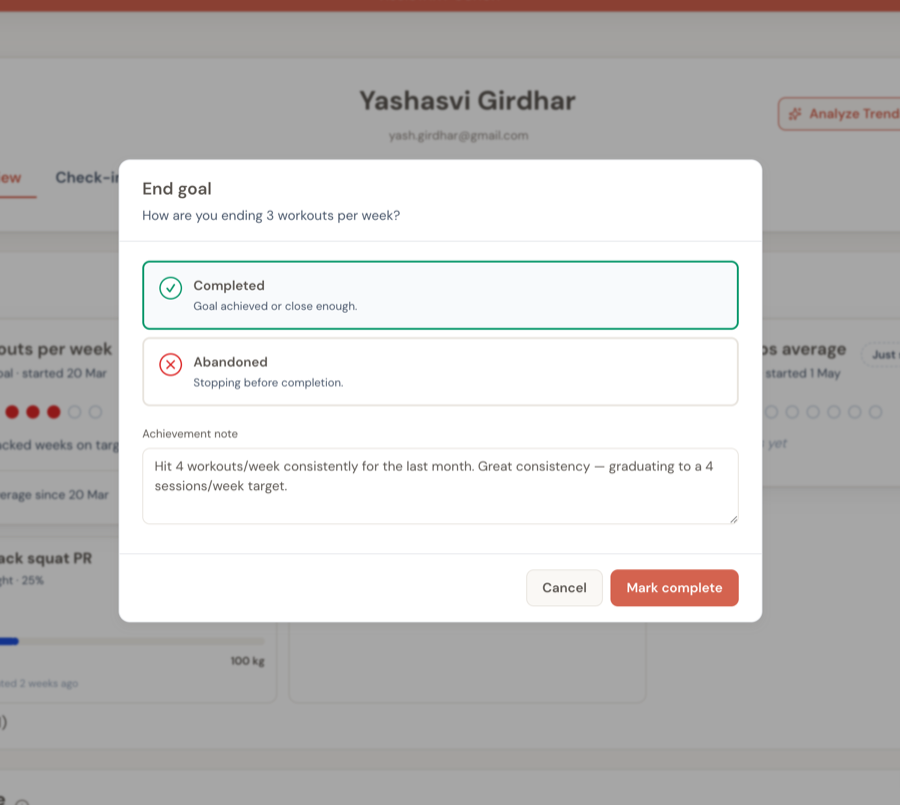
You always pick one of two outcomes:
- Completed — the goal was achieved (or close enough that you're calling it). The card moves to the historical section as a green win.
- Abandoned — you're stopping before completion. Maybe the goal wasn't right, maybe life changed, maybe it's being replaced. The card moves to historical too, but distinct from completed ones.
The note is optional in both cases, but worth writing — it's what your client sees when they look at the historical card later. For a completed goal, write the celebration. For an abandoned one, frame the reason kindly: "Replaced with a 2-day/week target that fits her new schedule" reads very differently to "Couldn't keep it up."
Don't leave abandoned goals dangling. As soon as you abandon one, create the replacement. A goal abandoned without a successor leaves a gap. A goal replaced with something better is a course correction.
Why I can't manually update her progress
Habit goals don't have an "Update progress" button. That's intentional — these goals update automatically from her weekly check-ins, so there's no number for you to type in.
If you want to change what the card shows:
- She missed a check-in but hit the target? Ask her to submit (or re-submit) the check-in for that week. The card recalculates immediately.
- You want to change the target? Edit the goal — the card recalculates against existing check-ins with the new bar.
- You want to extend or shorten the window? Edit the goal's duration. Same recalculation.
For goals where you DO need to type a current value in (weight, body fat, exercise PRs), see Tracking Goals.
Habit goal vs tracking goal — the one-sentence test
If the question is "is she doing this consistently?" → use a weekly goal.
If the question is "has she reached this number?" → use a tracking goal.
You'll almost always have both running for a client at once. Weekly goals capture the behaviour you're coaching — steps, sleep, training frequency. Tracking goals capture the result you and she are aiming for — weight, body fat, lift PRs. They're complementary; the weekly goal is how, the tracking goal is what.
Frequently asked questions
The "Average since…" number changed but I don't think she checked in this week — what happened? The average only updates with new check-ins. If you're seeing a different number than last time, look at her recent check-ins list — there's a new entry there.
Can I set a "between 7 and 9 hours of sleep" goal? Not yet — weekly goals support a single threshold (e.g. "at least 7 hours"). Two-sided ranges are on the wishlist.
She submitted a check-in but the card didn't update. Make sure the check-in's date is after the goal's start date. The card only counts check-ins that fall within the goal's window. If she submitted a check-in dated before the goal began, it won't show up in the dot row.
Can the client end the goal themselves? No. Coaches end goals; clients see the result. The intent is that ending a goal is a coaching decision (celebrate vs. course-correct), not a "give up" button.
Related guides:
- Tracking Goals — for goals that head toward a finish line (weight, body fat, exercise PRs)
- Setting Client Goals — strategy for picking how many goals, what kind, and what timelines
- Your Weekly Workflow — how to fold a glance at habit-goal pills into your weekly check-in batch