Reviewing Client Workouts
Workout logs are the most objective data you get from a client. Check-ins tell you how they feel. Logs tell you what they actually did. Reviewing them well means you catch problems early, reinforce good habits, and make programming decisions based on evidence rather than guesswork.
What to look for in logged data
Open a client's dashboard and go to the Workout Logs tab.
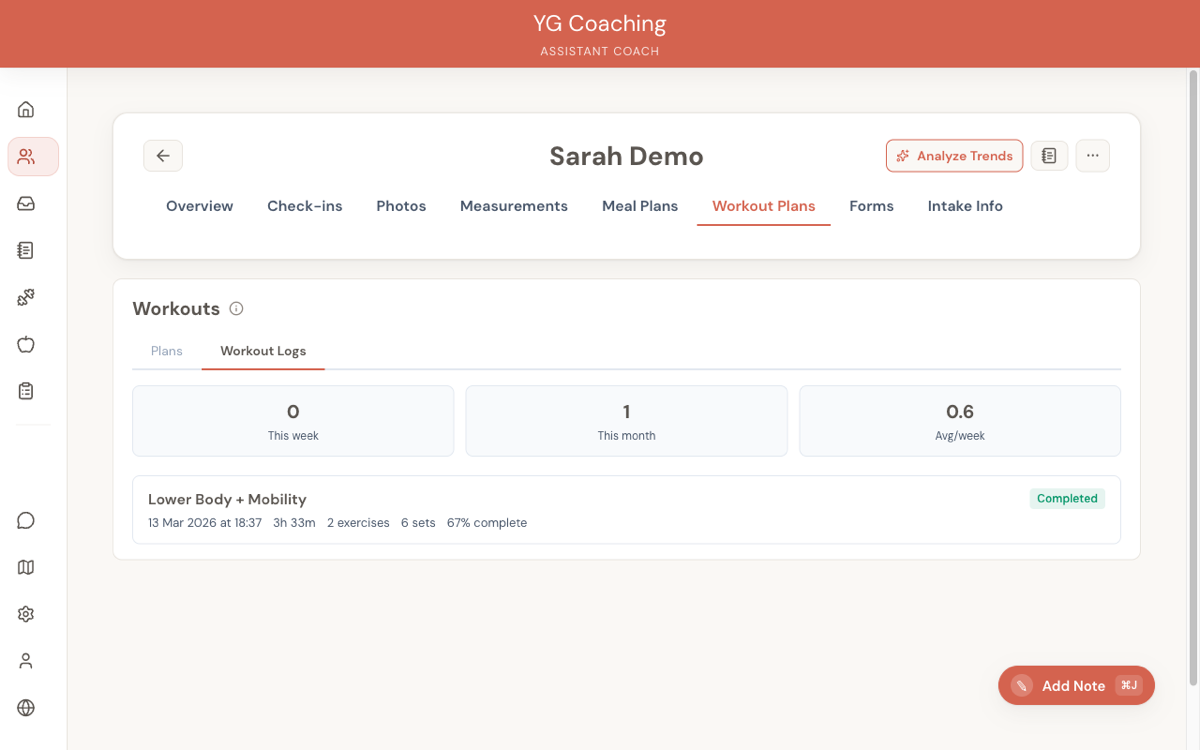 Start with the summary stats at the top (sessions this week, this month, average per week), then drill into individual sessions.
Adherence to prescribed weights and reps
Expand a session card to see the set-by-set breakdown. Each set shows actual weight and reps alongside the prescribed target, with delta indicators (e.g., "▼5lb", "▲2 reps"). What matters:
- Consistently under-prescribed weights — The client may be sandbagging, or the weights are genuinely too heavy and they're compensating by stopping short. Either way, ask.
- Consistently over-prescribed reps — If a client is hitting 15 reps on a set prescribed for 10, the weight is too light. This is programming feedback, not a client problem.
- Hitting targets cleanly — Good sign. The programme is calibrated. Note it, reinforce it, and progress when appropriate.
- Wild variance between sets — Set 1 at prescription, set 3 at half the weight. This can indicate poor rest management, fatigue accumulation, or the client rushing through the session.
Skipped exercises
Exercises the client didn't log any sets for are clearly marked. One skipped exercise in one session is nothing. A pattern is something:
- Same exercise skipped repeatedly — The client may not have the equipment, may not know how to do it, or may be avoiding it because it causes discomfort. Ask which one.
- End-of-session exercises skipped — The client is running out of time or energy. Consider reordering the session so priority work comes first, or shortening the programme.
- Entire sessions missing — Check the adherence stats. If a client is prescribed four sessions per week and consistently logging two, the programme doesn't fit their life. That's a plan problem, not a discipline problem.
Session duration
Duration tells you whether the session length matches your intent. A 45-minute programme taking 90 minutes suggests the client is resting too long or doing extra work. A programme finishing in half the expected time suggests they're rushing or skipping rest periods. Both are worth asking about.
Progression over time
Use the exercise trend graphs (available from the Logs tab) to see weight, volume, and estimated 1RM across sessions. This is where you assess whether the programme is actually driving progress.
- Steady upward trend — The programme is working. Keep going.
- Flat line over 3-4 weeks — Potential plateau. Check if other variables (sleep, nutrition, stress) explain it before changing the programme.
- Declining numbers — Something is off. Could be accumulated fatigue, life stress, or a programme that's outpaced the client's recovery capacity.
Don't react to a single bad session. Look at the trend across at least 2-3 weeks before drawing conclusions.
Writing session feedback
Every workout log has a Give Feedback button. Your feedback appears in the client's workout history, so they see it before their next session. This is a direct coaching touchpoint — use it well.
What good feedback looks like
Good feedback is specific, actionable, and short. The client should read it in under 30 seconds and know exactly what to focus on next time.
Useful feedback:
- "Bench press is moving well — you hit all prescribed reps cleanly. Let's bump the weight 2.5 kg next session."
- "I noticed you skipped the single-leg RDLs again. Is it a balance issue or equipment access? Let me know and I'll swap in an alternative."
- "Session duration was 85 minutes for a programme designed for 55. Are you resting longer between sets? Try setting a timer for your rest periods."
Less useful feedback:
- "Great workout!" — This tells the client nothing they can act on.
- "You need to try harder on squats." — Vague and demoralising. What specifically should they change?
- A paragraph covering every exercise — Too much to process. Pick the 1-2 things that matter most.
When to give feedback
Not every session needs a detailed response. Reserve feedback for sessions where there's something specific to say — a progression worth acknowledging, a pattern to address, or a cue to reinforce. Silence on a routine session is fine. Forced feedback on every log dilutes the signal.
When a client's numbers are poor, lead with curiosity rather than judgment. "I noticed your deadlift dropped 15 kg this week — anything going on?" lands better than "Your deadlift was weak this session." The data is already there; your job is to help them understand why.
Reviewing exercise videos
When a client records a set, the video appears inline in the workout log detail. Focus on things that affect safety or effectiveness, in rough priority order:
- Injury risk — Spinal rounding on deadlifts, knee cave on squats, excessive lumbar extension on overhead work. Flag these immediately.
- Range of motion — Partial reps where full range is intended (half squats, bench press not touching chest). This affects both stimulus and progression tracking.
- Tempo and control — Bouncing out of the bottom, using momentum instead of muscle, rushing the eccentric. These reduce training quality even when the weight and reps look fine on paper.
- Setup and positioning — Foot placement, grip width, bar path. These are technique refinements that improve long-term progress.
You don't need to catch everything in one video. Prioritise one or two issues per review. Giving a client five form corrections at once overwhelms them and means none of the corrections stick.
What you can skip
Minor variations that don't affect safety or stimulus aren't worth flagging. A slightly uneven grip, a head position that's personal preference, or a bar path that's 2 cm off ideal — these are coaching perfectionism, not coaching priorities.
Using video comments effectively
You can leave comments on individual exercise videos. Comments appear below the video and are visible to the client in their workout history.
Be specific and visual
Reference what you see in the video. "Your knees are caving inward at the bottom of the squat — you can see it at the lowest point of the rep. Try cueing 'push knees out' or imagine spreading the floor with your feet." Generic advice like "work on your squat form" doesn't tell the client what's wrong or how to fix it.
Prioritise major issues
If you see both a dangerous spinal position and a slightly too-wide stance, comment on the spinal position. Save the stance width for a future session after the bigger issue is fixed. One comment per video addressing the single most important thing. If the form is genuinely good, say so briefly — "This looks solid. Full depth, knees tracking well." Positive reinforcement encourages them to keep filming.
When they don't send videos
Mention it in their next check-in response with a specific request: "If you get a chance to film a set of deadlifts this week, I'd like to check your setup from the side angle." Give them a specific exercise and angle. Vague requests ("send me some videos") get ignored.
How often to review logs
The right approach depends on your client load.
Every session (low client count)
If you have fewer than 10 active clients, reviewing each session as it comes in is manageable. The client logs a workout, you review it within 24 hours, and your feedback is there before their next session. Ideal, but doesn't scale.
Weekly batch review (higher client count)
With 15+ clients, batch your workout reviews into a dedicated block — the same way you batch check-in responses.
- Scan adherence stats first — Who's logging consistently? Who's missed sessions? The summary numbers tell you where to spend your time.
- Drill into flagged sessions — Sessions with low completion, missed exercises, or client notes warrant a closer look.
- Check trend graphs — Glance at key lifts for each client. Flat or declining trends get your attention; steady progress doesn't need intervention.
- Skip routine sessions — A session where the client hit every target and nothing looks unusual doesn't need a detailed review. A quick "Solid session, keep it up" is enough, or skip feedback entirely.
The goal is to spend your review time where it matters, not to document every session equally.
When logged data signals a plan change
Here are the patterns that should make you reconsider the current plan:
- Adherence below 60% for 2+ weeks — The programme is too long, too frequent, or doesn't fit the client's schedule. Reduce session count or session length before anything else.
- All prescribed weights hit easily for 3+ weeks with no progression applied — You've left progress on the table. The client is ready for a load increase and you haven't programmed one.
- Consistent failure on the same exercise — If a client can't hit prescribed reps on an exercise for 3+ sessions, the weight is too heavy, the exercise doesn't suit them, or there's a mobility/injury issue. Swap, regress, or investigate.
- Session duration consistently 50%+ over target — The programme has too much volume for the client's available time. Cut accessory work or consolidate exercises.
- The client is adding exercises every session — They're bored or feel the programme doesn't hit something they care about. Ask what they're adding and why. You might need to adjust the plan to include it.
- Declining trend on key lifts despite good adherence — The client is likely under-recovering. Check nutrition, sleep, and stress before adding more training stimulus.
None of these signals require an immediate plan overhaul. They're prompts to investigate and make a targeted adjustment. Most plan changes should be small: swap an exercise, adjust a rep range, drop a session. Full rewrites are rarely necessary.
Related guides:
- Your Weekly Workflow
- When to Change a Client's Plan
- Reviewing Workout Logs -- feature reference
- Exercise Videos & Photos -- feature reference
- Advanced Techniques