Daily Habits
Daily habits make the days between check-ins visible. You choose a few behaviours that matter for one client, such as steps, water, sleep, energy, or a ten-minute stretch. The client records them from the Today card in their client app, and you see the week on their Overview.
Begin with two or three habits that would genuinely change your coaching. A short list is easier for the client to use every day and easier for you to read. Add another habit only when the first ones feel settled.
Add a daily habit
- Open the client's page and stay on Overview.
- Scroll to Daily habits.
- Select Add habit.
- Choose a common habit or write your own.
- Pick how the client will answer, add a target if it helps, then save.
You can use three answer types:
- Number for steps, water, sleep, portions, coffees, or another amount. A target can be at least or at most.
- Yes / no for something the client either did or did not do, such as a walk after lunch or ten minutes of stretching.
- Scale for a feeling or state. Choose two to five plain words in order, such as Drained · Steady · Energised. Common scales for energy, hunger, stress, mood, and digestion are ready to choose.
Steps, water, and sleep use the correct units automatically. For your own number habit, add a short unit that will make sense to the client, such as g, cups, or portions.
What your client sees
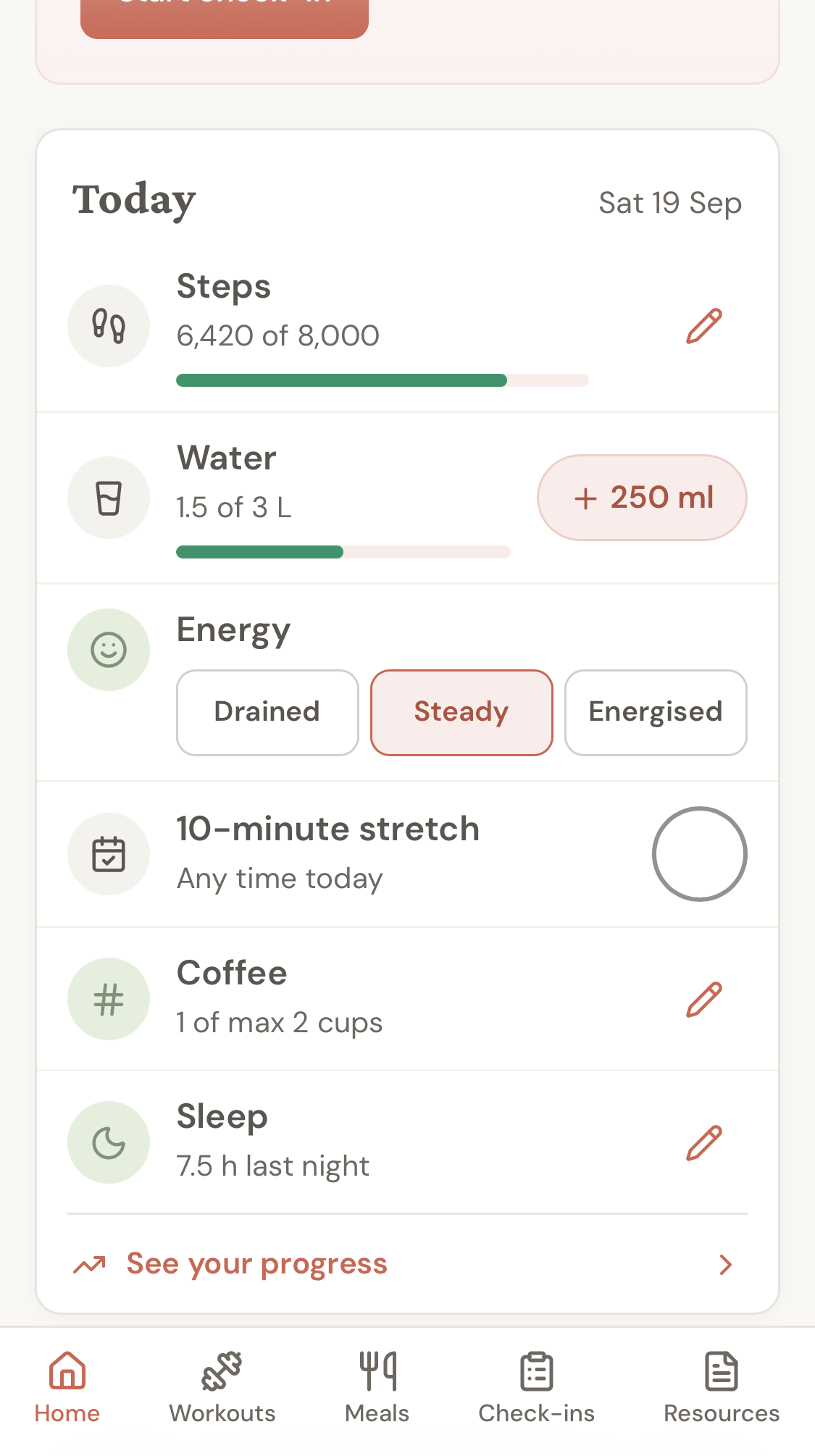
The Today card sits near the top of the client app Home screen. A client can tick a yes/no habit, choose a scale word, add water in one tap, or open a number field for an exact value.
The card stays calm as the day progresses. It shows what has been entered, what is still open, and All done when every habit has an answer. It does not use streaks, red missed-day warnings, or a score that resets.
When you add a habit or make a meaningful change, the client gets one quiet in-app notification:
Your coach updated your daily habits.
Open Today to see what's changed.
Adding several habits together still creates one current notification. The client is not sent an email or push notification.
Read the week
The coach view shows one row per habit and one column per day. Number habits are plotted against the target, scale habits use the words you chose, and yes/no habits show whether the client ticked them.
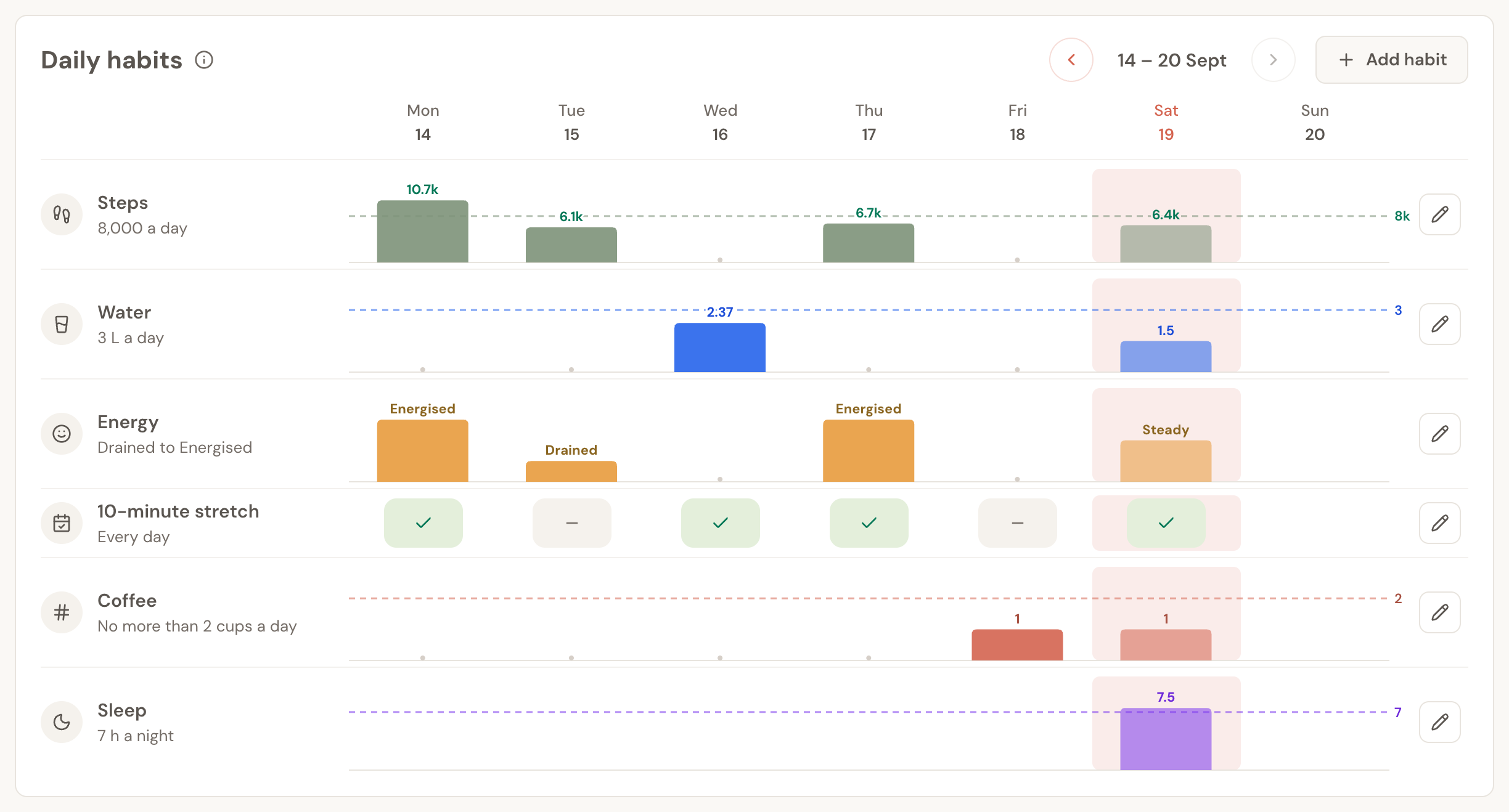
Use the arrows to look at earlier weeks. Read the pattern before reacting to one day:
- A missing day may simply mean the client forgot to log it.
- A number that drifts for several days is more useful than one unusually high or low entry.
- A repeated scale answer can give you the question for the next check-in, such as why energy drops late in the week.
Daily habits do not replace the check-in. They give you better context for the conversation.
Progress and missed days
Clients can select See your progress to review the week and open a month for any habit. They can also fill in or correct today and any of the previous six days. Older days stay visible but cannot be changed.
This seven-day window keeps the record forgiving without turning it into a long reconstruction exercise. If the client missed a day, ask them to fill it in while the week is still fresh.
Change or remove a habit
Use the pencil beside a habit to change its name, target, unit, or scale words. A meaningful change sends the same single in-app notification described above. A small name correction does not.
Removing a habit takes it off the coach view and the client's Today card. Answers already recorded are kept, so removing something does not rewrite the client's history.
For a scale, an option that already has answers cannot be removed because that would change what the older entries mean. Rename it instead, or leave it in place and create a new habit when the scale itself needs to change.
Daily habits and Weekly Goals are different
Use Daily habits when the client should record something each day and you want to see the shape of the week.
Use a Weekly Goal when you want a longer coaching target, such as averaging 8,000 steps or training four days a week, scored from weekly check-ins across a set number of weeks.
The two can work together. Daily habits show what happened from Monday to Sunday; Weekly Goals show whether the broader behaviour is holding over time.
Frequently asked questions
How many daily habits should I give a client?
Start with two or three. Add only habits that would change what you coach or what the client does. The product allows a larger list, but a shorter Today card is usually more useful.
Can clients add their own habits?
No. The coach chooses and changes the habits in this first version. Clients record their answers and review their progress.
Can a client log an older day?
They can fill in today and the previous six days. Earlier days are visible but read-only.
Are there daily reminders?
Not yet. Adding or materially changing habits creates one in-app notification, but there is no scheduled daily reminder in this version.
Do daily steps, water, or sleep automatically change a Weekly Goal or check-in answer?
Not yet. Daily habits and Weekly Goals currently keep their own records. Use the daily week as context when reviewing the client's check-in.