Exercise Library
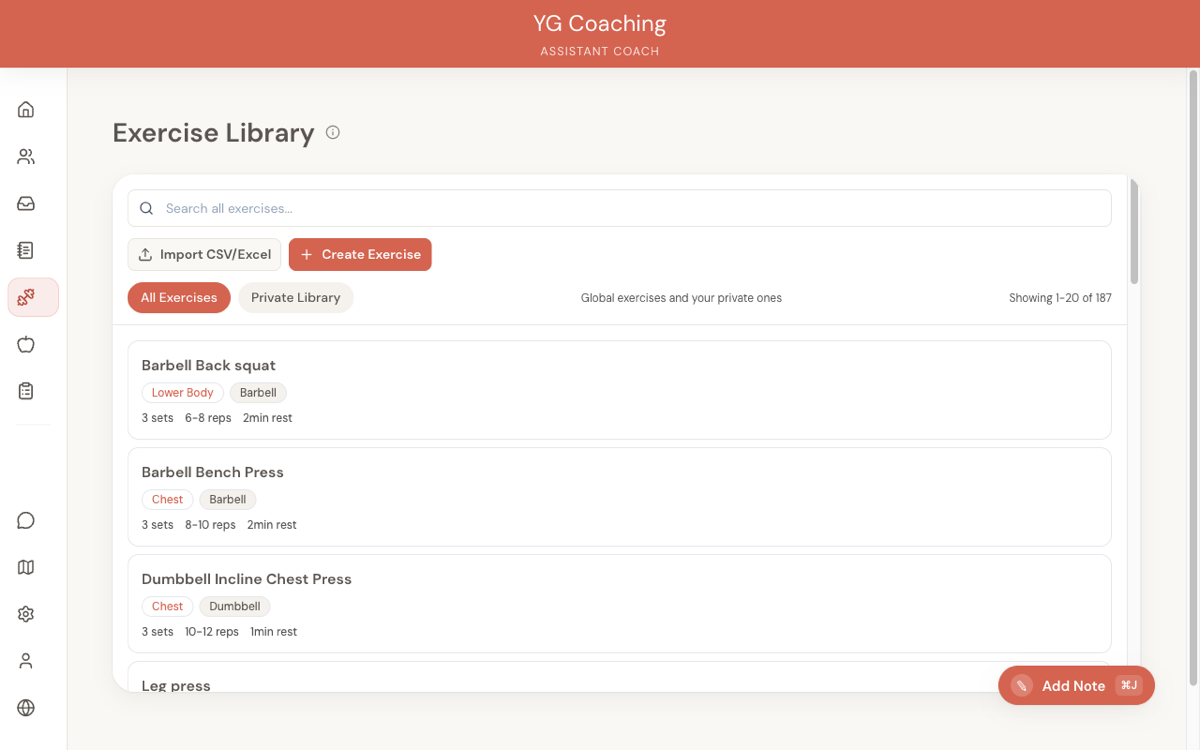
The exercise library is your database of exercises that powers the workout plan builder. It comes pre-loaded with common exercises and lets you add your own custom entries.
Global library and your private library
The exercise library has two layers:
- Global library — A shared set of common exercises available to all coaches. These cover standard movements across all muscle groups and equipment types. You can use them in your plans and override the defaults, but you can't edit or delete them.
- Your private library — Exercises you create yourself. These are visible only to you and are useful for branded variations, uncommon movements, or exercises with specific form cues you want to document. Private exercises are fully editable and deletable.
When searching or browsing, you can toggle between All Exercises (global + private combined) and Private Library (only yours) to quickly find what you need.
Browsing the library
In the workout plan builder, the right panel is your exercise library. When you're not searching, it shows your most-used exercises — making it quick to find the staples you program regularly.
Each exercise card displays:
- Exercise name
- Muscle group — Shown as a colored badge (e.g., Chest, Back, Legs)
- Equipment — Shown as a grey badge (e.g., Barbell, Dumbbell, Bodyweight)
- Default parameters — Sets, rep range, and rest period
Click on an exercise card to see full details, including notes and a YouTube demo link (if available).
Searching
Type in the search bar to find exercises by:
- Name — "bench press", "Romanian deadlift"
- Muscle group — "chest", "back", "legs"
- Equipment — "barbell", "dumbbell", "cable"
Results appear in real-time as you type (after a brief delay). Minimum 2 characters to trigger a search.
Creating custom exercises
Click Create Exercise in the library panel to add your own.
The form includes:
- Exercise name (required) — e.g., "Banded Hip Thrust"
- Muscle group — Choose from: Chest, Back, Shoulders, Legs, Arms, Core, Full Body
- Equipment — Choose from: Barbell, Dumbbell, Bodyweight, Machine, Cable, Kettlebell, Resistance Band, Other
- YouTube URL — Link to a demonstration video (validated to ensure it's a YouTube link)
- Default sets — What this exercise typically calls for (1–10)
- Default rep range — e.g., "8-12", "3x5"
- Default rest period — In seconds (30–600)
- Unilateral — Check this if the exercise works one side at a time (e.g., single-arm rows)
- Notes — General notes about the exercise (form tips, common mistakes, etc.)
These defaults are pre-filled when you add the exercise to a workout plan, saving you time. You can always override them per-plan.
Adding YouTube links to your exercises is one of the highest-value things you can do in your library. Clients can reference the demo videos directly from their workout plan, which means fewer form questions and better execution.
Importing exercises via CSV
If you have a large list of exercises to add, you can import them in bulk via CSV instead of creating them one at a time. Download the template here: Exercise Import Template (CSV)
The template includes columns for name, muscle group, equipment, sets, reps, rest, YouTube URL, and notes.
Editing and deleting exercises
Exercises in your private library can be edited or deleted from the exercise detail modal.
- Edit — Update any field: name, muscle group, equipment, defaults, YouTube link, or notes
- Delete — Remove from your library. You cannot delete an exercise that's currently used in any workout plan — remove it from all plans first.
Global exercises can't be edited or deleted, but you can always override their defaults when adding them to a plan.
Exercise defaults and overrides
The library stores default parameters for each exercise (sets, reps, rest). When you add an exercise to a workout plan, these defaults are pre-filled.
But every instance in a plan is independent — changing the sets from 3 to 4 in a plan doesn't affect the library default. This means you can use the same exercise across multiple plans with different parameters.
Muscle groups and equipment
Available muscle groups: Chest, Back, Shoulders, Legs, Arms, Core, Full Body
Available equipment: Barbell, Dumbbell, Bodyweight, Machine, Cable, Kettlebell, Resistance Band, Other
These categorizations help with searching and provide visual badges on exercise cards, making it easy to scan a session at a glance and verify you're hitting the right muscle groups.