Workout Plan PDF Export
Every workout plan can be exported as a professionally formatted PDF for your clients to follow in the gym. The PDF includes every session, exercise, and parameter — everything they need to execute the program.
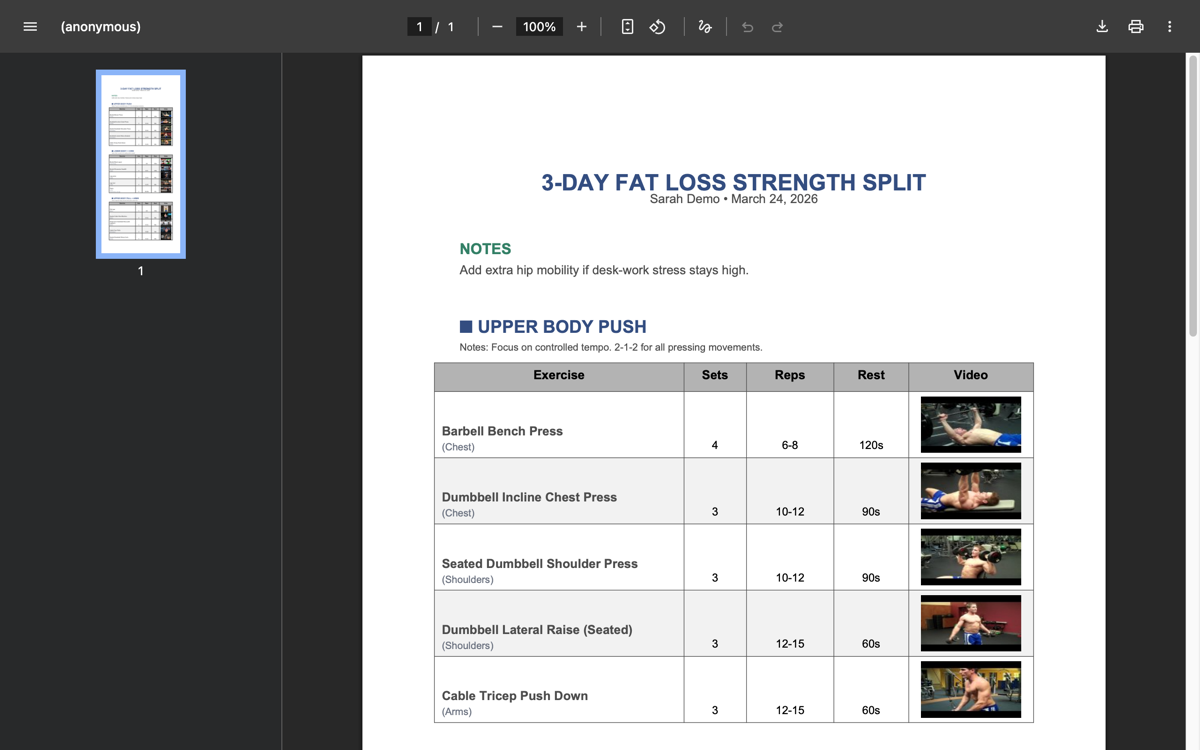
How to export
From the workout plan builder: Click the Export button in the builder header. If you have unsaved changes, the system will auto-save before exporting. The PDF downloads to your device.
New plans must be saved at least once before you can export. The export button is disabled for unsaved drafts.
From the client's Workout Plans tab: Each plan card has actions for downloading and previewing the PDF.
What's included in the PDF
The exported PDF contains:
- Plan name and description — So the client knows which program they're on
- Duration — How many weeks the plan runs
- All training sessions — Listed in order, each with:
- Session name and type
- Every exercise with:
- Exercise name
- Sets, rep range, and rest period
- Weight notes (e.g., "RPE 8", "60% 1RM")
- YouTube demo video links
- Session-level notes
The format is designed to be practical — something a client can pull up on their phone between sets or print out and bring to the gym.
Your name on the plan
Workout plan PDFs are headed and signed the same way your meal plans are: "Workout plan for Emma" at the top with the plan's name underneath, by you below that, and your photo, name, brand name and links at the end.
The same two switches under Settings → PDF exports decide whether your website and Instagram appear, so both kinds of plan match whatever you choose. See Meal Plan PDF Export for the details.
Client access
When a workout plan is active, the client can download the PDF directly from their client app. They'll see a download button on their plans section.
If you update the plan and re-save, the client always gets the latest version when they download.
Tips for effective workout plan PDFs
Use weight notes consistently. Whether you prescribe RPE, percentages of 1RM, or specific weights, be consistent so your client knows what to expect.
Add exercise notes for form cues. Brief notes like "Pause at bottom" or "Control the eccentric" make the PDF much more useful than just sets and reps.
Include YouTube links. Exercises with demo videos give clients a reference they can check right from the plan. Especially valuable for less common movements.
Name sessions clearly. "Upper Body — Push Focus" is more useful than "Day 1" when a client is looking at the plan mid-week.