Supersets & circuits
Use a superset or circuit when you want a client to move through exercises back-to-back before resting. Assistant Coach keeps the setup simple: link the exercises, choose the rounds and rest, and the client app guides the order.
Superset or circuit?
You do not need to choose a name:
- Two linked exercises become a Superset.
- Three or more linked exercises become a Circuit.
The name changes automatically if you add or remove an exercise.
Group exercises
- Open a client's workout plan or a reusable workout template.
- Open a session that has at least two exercises.
- Click the ⋯ at the end of an exercise's row and choose Group with another exercise, then tick the exercises to run back-to-back.
- Set the number of Rounds and create the group.
- Set the Rest between rounds in the group's row, then save the plan or template.
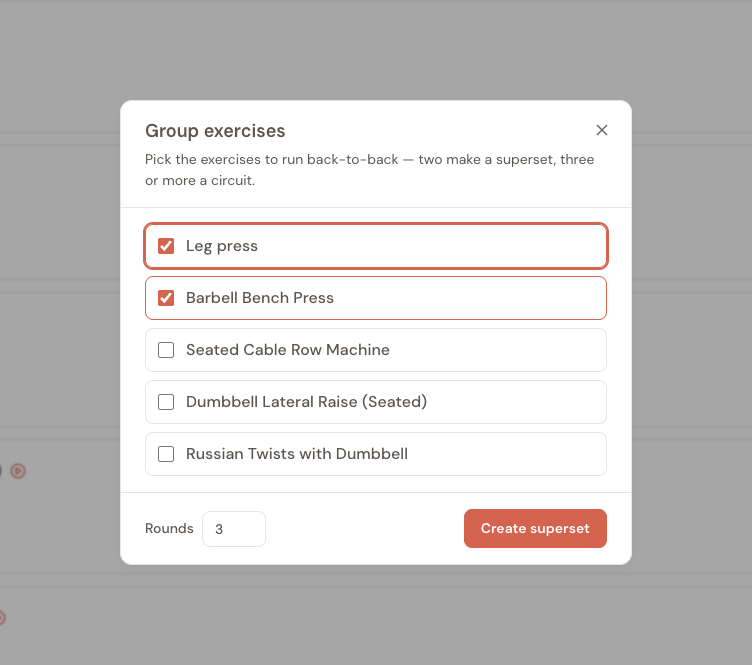
There's a quicker way for two exercises that sit next to each other. Hover over the line between their rows and a small Make superset button appears; click it and the same window opens with both exercises already ticked. Between an exercise and an existing superset or circuit, the button reads Add to circuit and opens that group's window with the exercise already ticked. On a phone or tablet, use the ⋯ menu instead.
The Rounds box starts at the set count of the exercise you started from. Change it before you create the group, or later in the group's row.
How a group looks in the session
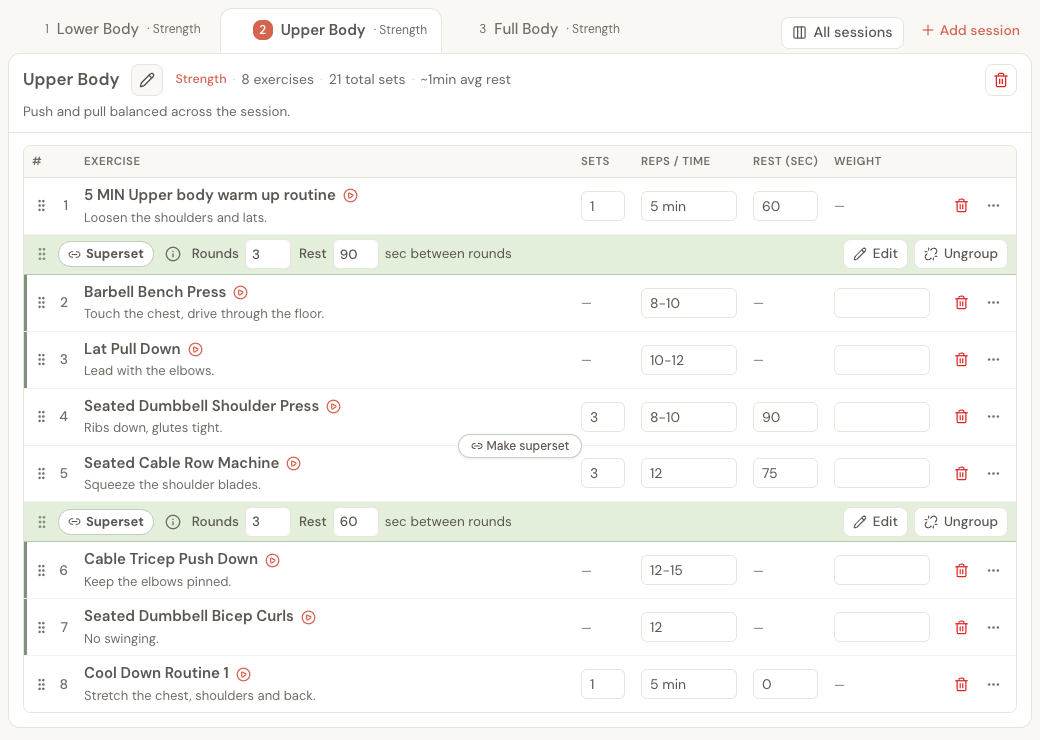
A superset or circuit shows as a green row above its exercises, all on one line:
- Superset or Circuit, named for you from the number of exercises.
- Rounds — how many times the client goes through the whole group.
- Rest — the seconds of rest between rounds.
- Edit — change which exercises are in the group, or its rounds.
- Ungroup — split the group back into separate exercises.
Type straight into the Rounds and Rest boxes to change them. The exercises inside the group have a green line down their left edge. Their Sets and Rest columns show a dash, because the group sets the rounds and the rest for all of them. Each exercise still has its own reps, weight and note.
What rounds and rest mean
The group has one shared prescription:
- Rounds are how many times the client completes every exercise in the group.
- Rest between rounds starts only after the final exercise in a round.
- There is no programmed rest between exercises inside the same round.
- There is no extra group rest after the final round.
For example, a three-round superset of squats and rows runs as: squat, row, rest; squat, row, rest; squat, row, finish.
You can still give each exercise its own reps, load guidance, note and form-video request.
What your client sees
The client app shows the automatic group name, the current round, and the next exercise. After a set is logged, it moves to the next exercise in the group. After the final exercise in a round, it starts the group's rest timer before returning to the first exercise.
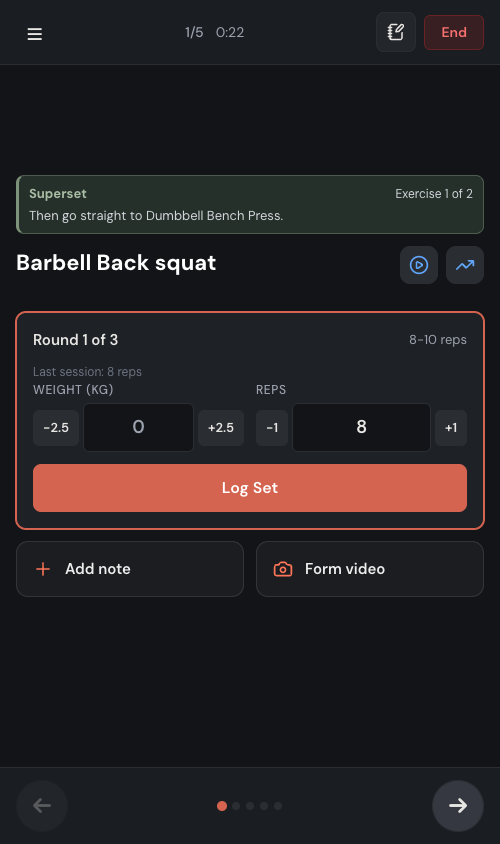
If the client closes the app or loses their connection, their completed sets remain saved locally. When they resume, the logger returns to the earliest unfinished exercise and round. Offline changes sync when the app is open and online again.
Completed-workout review and exported workout PDFs keep the Superset or Circuit label, rounds, exercise order, and between-round rest visible.
Reorder or undo a group
- Drag the six-dot handle at the start of the green row to move the whole Superset or Circuit as one item.
- Drag an exercise inside the group by its handle to change its back-to-back order.
- With a keyboard, click a handle and use the Up or Down arrow key.
- To take one exercise out of a circuit, click Edit on the group's row and untick it.
- Click Ungroup to turn every exercise in the group back into a separate exercise.
A group always has at least two exercises. If you delete one of the two exercises in a superset, or move it to another session, the superset ends and the other exercise stays in the session on its own. You can regroup it or leave it separate before saving.
When to use each one
Supersets work well when two exercises belong together, such as opposing muscle groups or a main movement followed by an accessory. Circuits are useful when the client should rotate through three or more stations before resting.
Keep the client's environment in mind. A back-to-back group that needs equipment at opposite ends of a busy gym may look efficient on paper but be awkward in practice. Group exercises that the client can move between safely and consistently.
Frequently asked questions
Can a client add an exercise to a prescribed group?
No. A client-added exercise stays separate from the coach's Superset or Circuit. This protects the prescribed order while still letting the client record extra work.
What happens to an active workout if I edit its plan?
An active workout keeps the version that was present when it started. Your edits apply the next time the client starts that session.