AI Workout Coverage Analysis
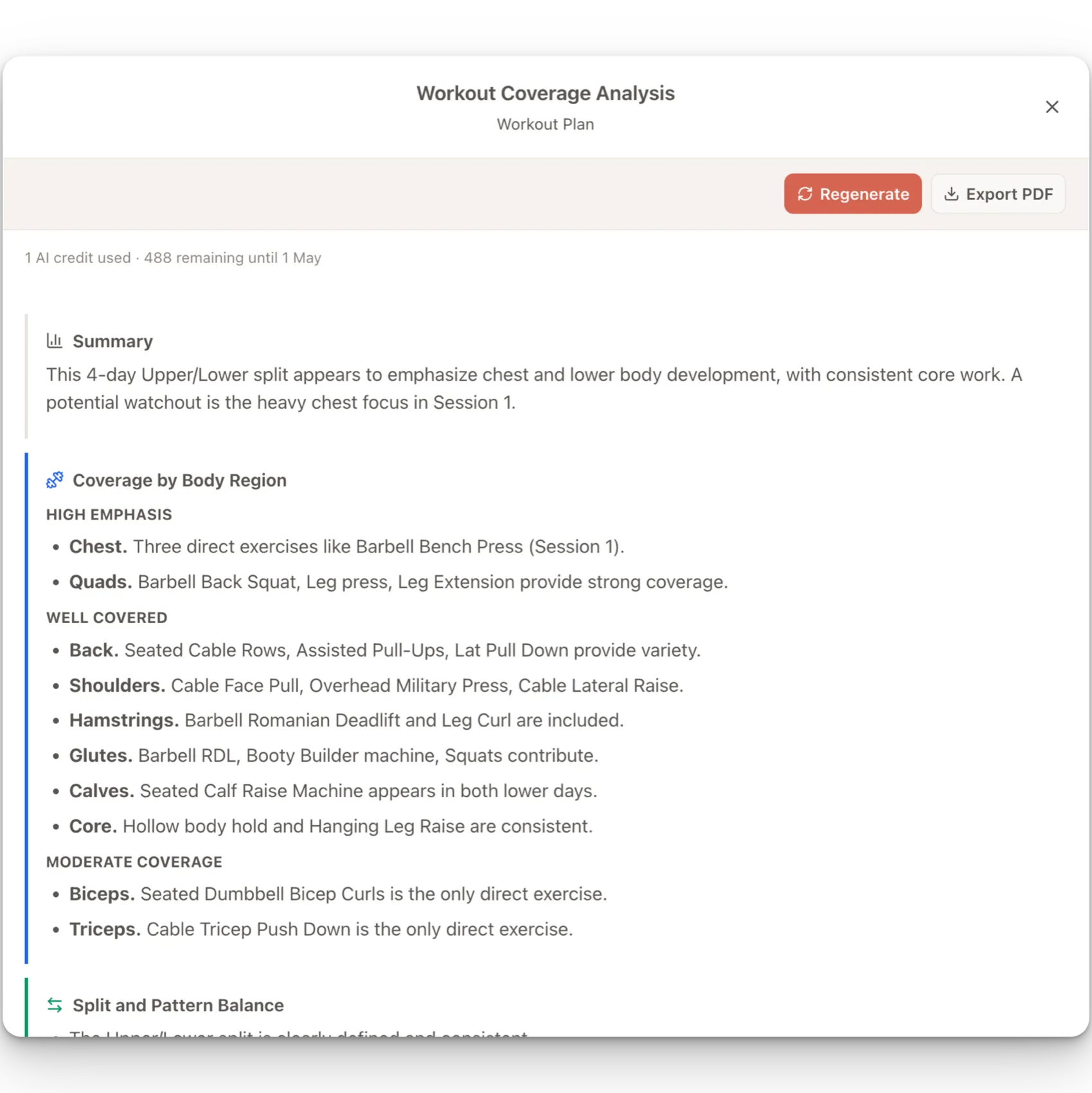
AI workout coverage analysis gives you a coach-facing structural review of a workout plan before you activate it for a client. It is designed to help you spot obvious blind spots, repeated stress, and split-balance issues without manually scanning every session.
The analysis is advisory. Assistant Coach does not edit the plan, activate it, or make client-facing claims. You stay in control of the programming decisions.
When to use it
Use Analyze Coverage when you want a second pass on the plan structure:
- Before activating a new plan
- After duplicating a plan into a new phase
- When building a more complex split with several sessions
- When you want to check whether the plan matches its intended emphasis
- When you suspect a body region or movement pattern may be underrepresented
What it reviews
The analysis looks at the saved workout plan and summarizes:
- Body-region coverage across chest, back, shoulders, arms, quads, hamstrings, glutes, calves, and core
- Split and movement-pattern balance, such as push versus pull or knee-dominant versus hip-dominant work
- Likely gaps or under-emphasized areas
- Redundancy or repeated stress across the week
- Short coach-facing suggestions
It uses session names, exercise names, exercise order, sets, rep ranges, notes, equipment, and library muscle groups as evidence.
How to run analysis
- Open a client dashboard.
- Go to Workout Plans.
- Open a saved workout plan or create a new one.
- Add the sessions and exercises you want reviewed.
- Click Analyze Coverage in the builder header.
If the plan has unsaved changes, Assistant Coach saves the latest version first. The analysis reviews that saved version.
Reading the report
The report is organized into sections:
- Summary — The apparent split or intent, main emphasis areas, and biggest caution.
- Coverage by Body Region — Body regions grouped by emphasis level, with short evidence from the plan.
- Split and Pattern Balance — Notes on movement-pattern balance when the plan provides enough evidence.
- Gaps / Watchouts — Areas that may need a coach review.
- Suggestions — Optional, practical adjustments or checks.
The output avoids numeric coverage scores because the current workout-plan data does not know true training stimulus, proximity to failure, recovery cost, or exact muscle contribution from compound lifts.
Regenerating after edits
Coverage analysis is not stored as a permanent plan record. It belongs to the current builder session.
If you edit the plan after an analysis completes, the report is marked stale. Click Regenerate to save the latest plan and run a fresh review.
Exporting a PDF
After an analysis completes, click Export PDF to download a copy of the report. This is useful for your own records or for discussing programming changes outside the app.
The PDF export uses the report currently shown in the coverage panel. If the report is stale, regenerate it before exporting.
Assistant actions
Each successful workout coverage analysis uses 1 assistant action. Failed runs do not consume an action. See Assistant Actions for how the monthly allowance works.
Limitations
The analysis is a structural review, not a replacement for coaching judgment. It does not know:
- The client's full injury history or medical constraints
- Actual effort, RIR, RPE, or proximity to failure
- True hypertrophy stimulus from each exercise
- Recovery state or fatigue outside the visible plan
- Whether an unusual emphasis is intentional unless the plan structure makes that clear
Treat the output as a programming assistant: useful for catching issues and prompting review, but not as an automatic verdict on whether a plan is right.