Workout Calendar
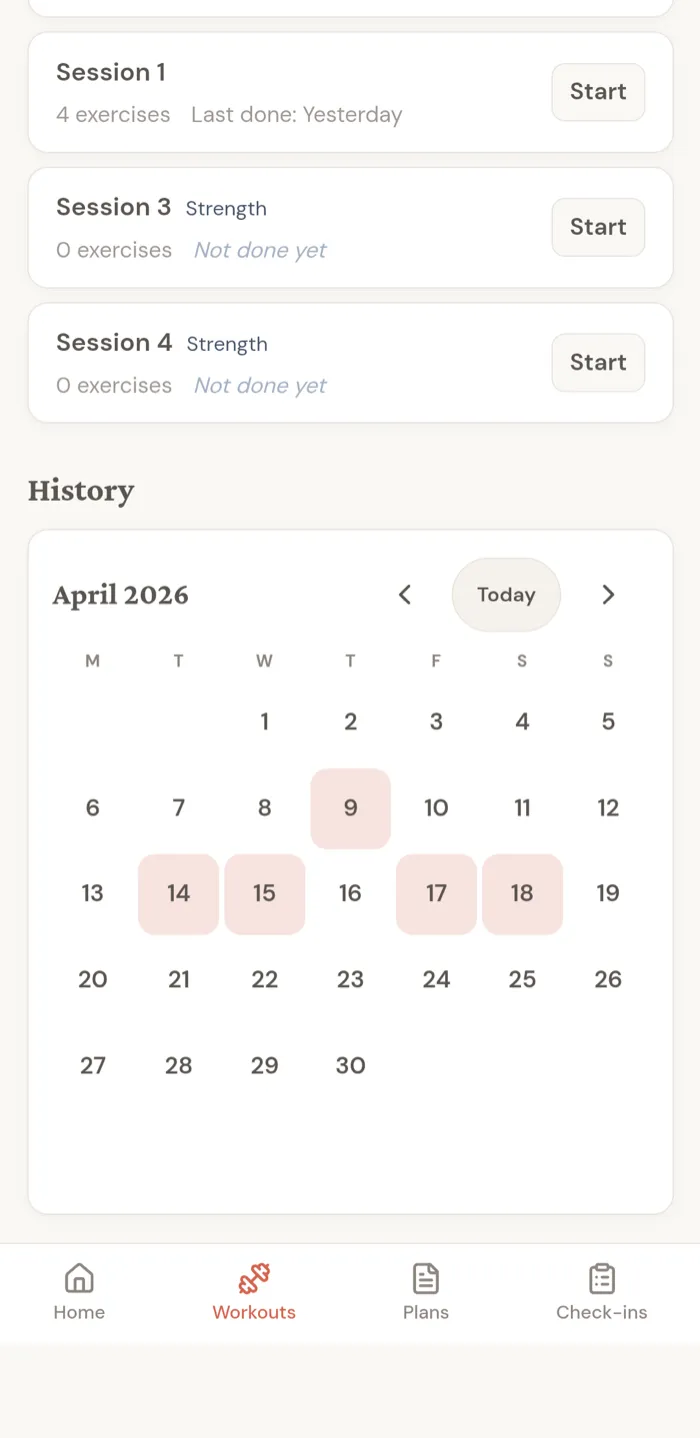
The workout calendar appears in the client app's Workouts tab, below the active workout sessions, under a History heading that introduces it. It shows which days have completed workouts for the current month.
Reading the calendar
Days with completed workouts are highlighted. Today's date is outlined when no workout has been logged today, and filled when today has a completed workout.
Future days are shown faintly and cannot be opened. Empty days are left plain.
Moving between months
Use the left arrow to view previous months. Use the right arrow to return toward the current month.
When you are viewing an older month, the Today button appears. Tap it to jump back to the current month.
Opening a workout
Tap a highlighted workout day to open that workout's full detail view.
If more than one workout was completed on the same day, the calendar opens the most recent workout from that day.
When a workout is opened from the calendar, the back arrow returns to the Workouts tab.