Meal Plan PDF Export
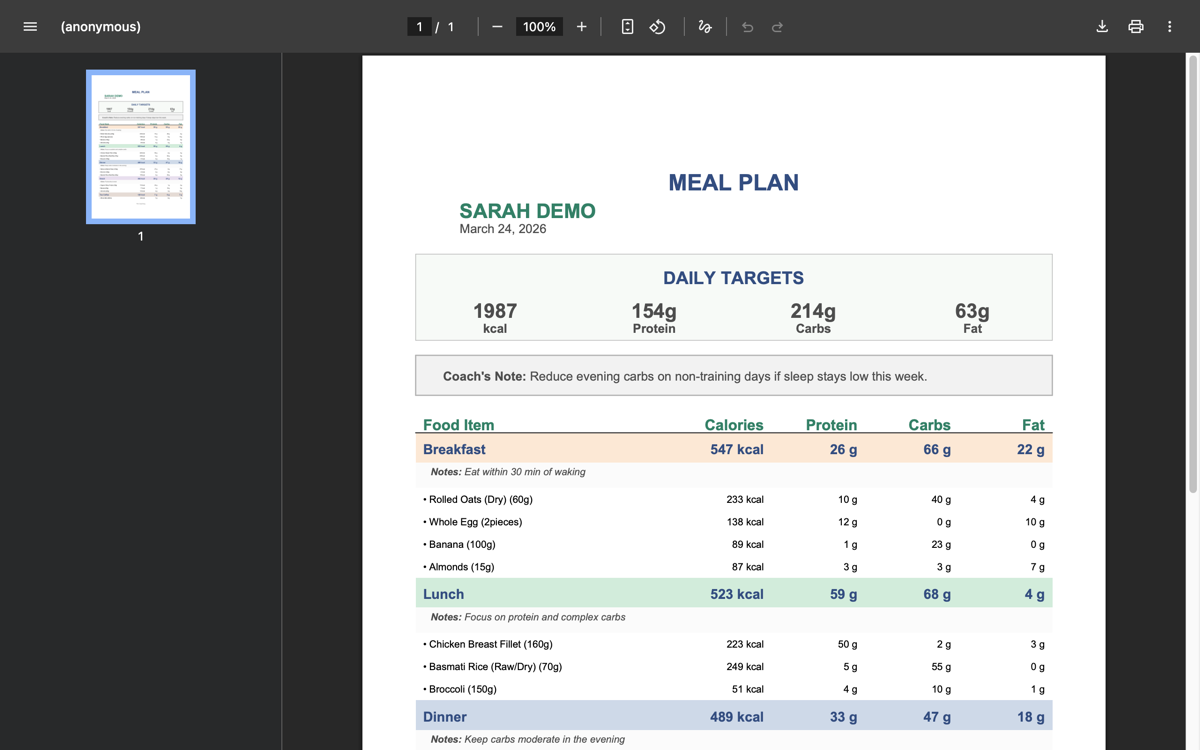
Every meal plan can be exported as a clean, professionally formatted PDF that you can share with your clients. The PDF is designed to be something a client can save on their phone, print out, or reference during meal prep.
How to export
There are several ways to get the PDF:
From the meal plan builder: Click the Export PDF button in the builder header. The PDF downloads to your device.
The export button is disabled for unsaved plans. Save your changes first, then export.
From the client's Meal Plans tab: Each plan card has two PDF actions:
- Download (download icon) — Downloads the PDF directly
- Preview (eye icon) — Opens the PDF in a new browser tab
What's included in the PDF
The exported PDF contains everything your client needs to follow the plan:
- Macro targets — Daily calorie, protein, carbs, and fat goals
- Coach notes — Any notes you've written in the plan (instructions, tips, prep reminders)
- Each meal — Listed in order (breakfast, lunch, dinner, snacks, etc.)
- Meal name
- Individual food items with quantities and units
- Per-food nutritional breakdown
- Meal-level notes (if any)
- Meal nutritional totals
- Daily nutritional totals — How the full plan adds up against the targets
The format is clean and easy to scan — designed to be useful in a kitchen, not just on a screen.
Client access
When a meal plan is active, the client can also download the PDF directly from their portal. They'll see a download button on their plans section. This means you don't have to manually send the PDF — it's always available to them.
If you update the plan and re-save, the client's download link always points to the latest version.
Tips for good meal plan PDFs
Set accurate macro targets before exporting. The PDF shows targets prominently, so make sure they reflect what you've actually prescribed.
Use coach notes. A few lines of context — "Drink 3L water daily", "Swap meals as needed to fit your schedule" — make the PDF much more useful than a raw food list.
Add meal-level notes for specific instructions. "Eat within 30 minutes of training" on a post-workout meal, or "Can substitute with Greek yogurt" on a snack.
Name custom meals clearly. If you're using custom meal types beyond the standard breakfast/lunch/dinner, give them descriptive names that make sense to the client.